

The Claude Code brain for AI-native marketing teams
Building with Claude Code is easy when you're a one-person team. This is what it actually takes when you're a team of eighteen.

Welcome back to The Workflow, where every “I built an AI agent army” LinkedIn post makes us want to evaporate.
The 2026 Claude Code hype script goes like this: a newborn AI bro discovers Claude Code, automates one task, and concludes they can now replace their entire marketing team.
Spoiler: Building an army of skills and automating your content creation when you’re flying solo is a cool flex, but…
What does it actually take to roll out a Claude Code marketing brain across an 18-person team, when you’re the one who has to build it, sell it internally, and keep it running?
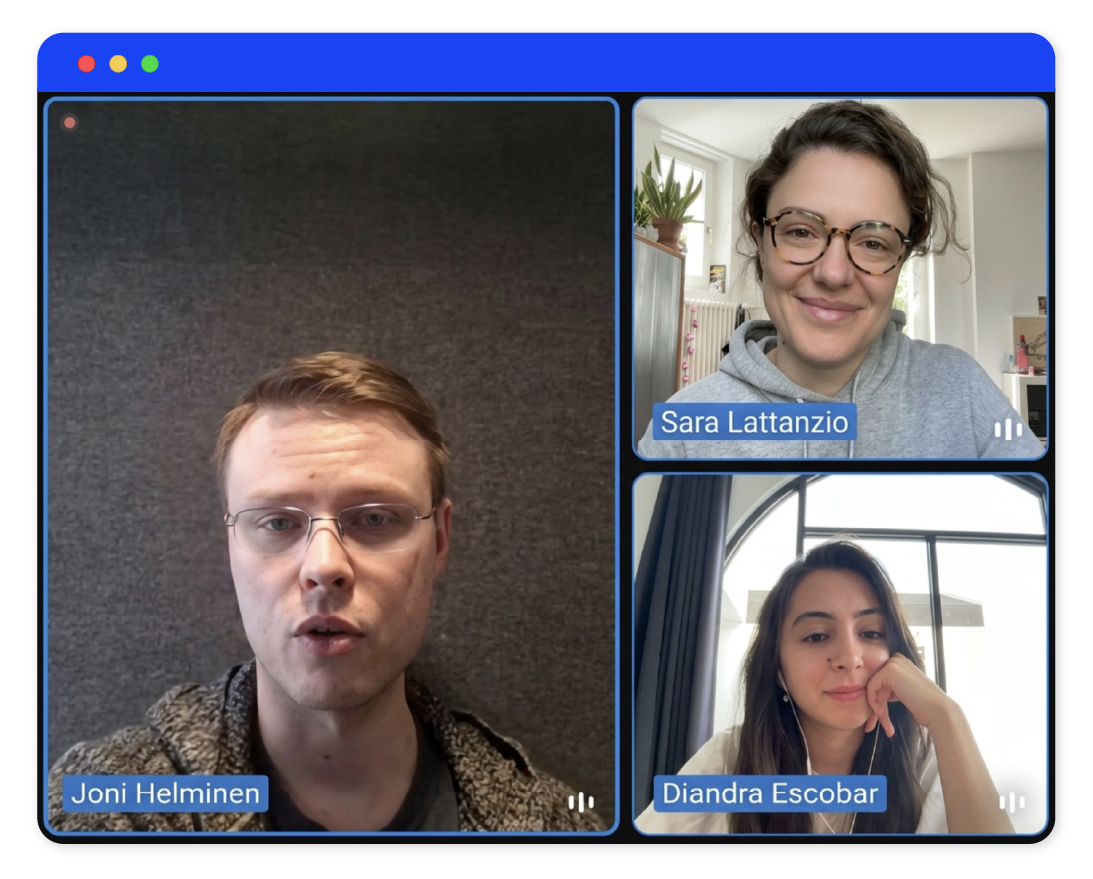
This week’s guest, Joni Helminen, is the CMO of Finnish recruitment company Barona. Joni doesn’t post much on LinkedIn, but when his post about recreating his marketing brain in Claude Code broke our feeds, we knew we had to get him on The Workflow before the next AI bro got to him first.
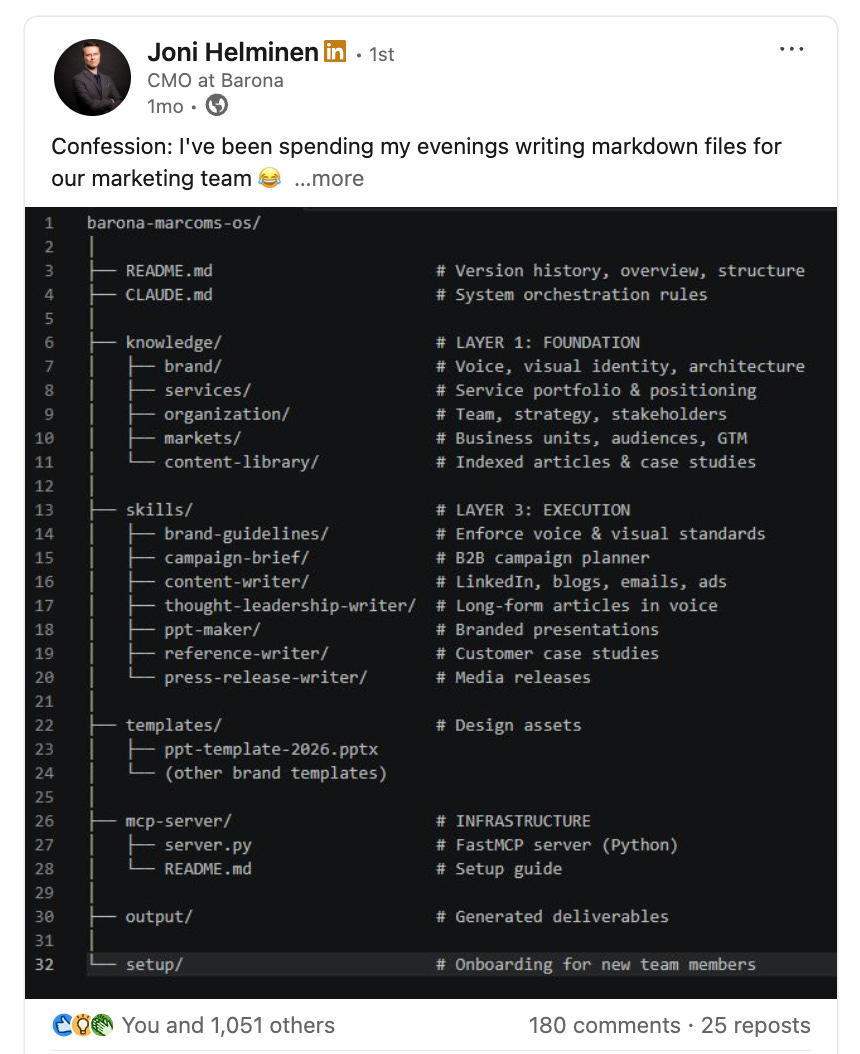
Over the last few months, Joni has spent his evenings perfecting the art of writing markdown files. The Marcoms Operating System (Marketing OS) was born from his streak: a centralized GitHub and Claude Code system of markdown files, skills, tools, and MCPs now powering his team’s operations.
Today, we bring you behind the curtains of Joni’s journey building his team’s AI marketing brain, and we will answer the question 99% of content on Claude Code misses: what does it actually take to make this work in a real business context, with different people, different stakeholders, and company policies?
✅ What you’ll learn
How to build a marketing AI operating system your entire team can use
How to use the four-layer framework to feed the system the right context
How to roll out the system across your team with the right governance and usage permissions in place
How to keep the system evolving so it gets smarter with every output your team produces
🧨 What triggered The Workflow
No marketing leader wakes up one day thinking, “Yay, I want to spend hours building a Marketing OS with Claude Code.” On the other hand, most teams keep Frankensteining their way through AI systems. Everyone runs their own tools, their own context, their own version of the brand voice.
On top of that, there’s usually a very different AI literacy level across people on the team. Some build custom skills in Claude Code. Others still use it as an advanced research tool.
“If people use AI at a very basic level, they end up producing worse outcomes than if they weren’t using it at all,” Joni told us.
The chaos was spreading across other functions too. Devs were building their own tools. Salespeople were building their own creations. If marketing kept doing the same, the brand positioning and tone of voice would die a little more with every prompt.
To course correct, Joni stopped thinking about AI as a tool every team member had to adopt and started thinking about it as infrastructure. His job, as a marketing leader, was to build it.
🧑🏼💻
🛠️ How to build The Workflow
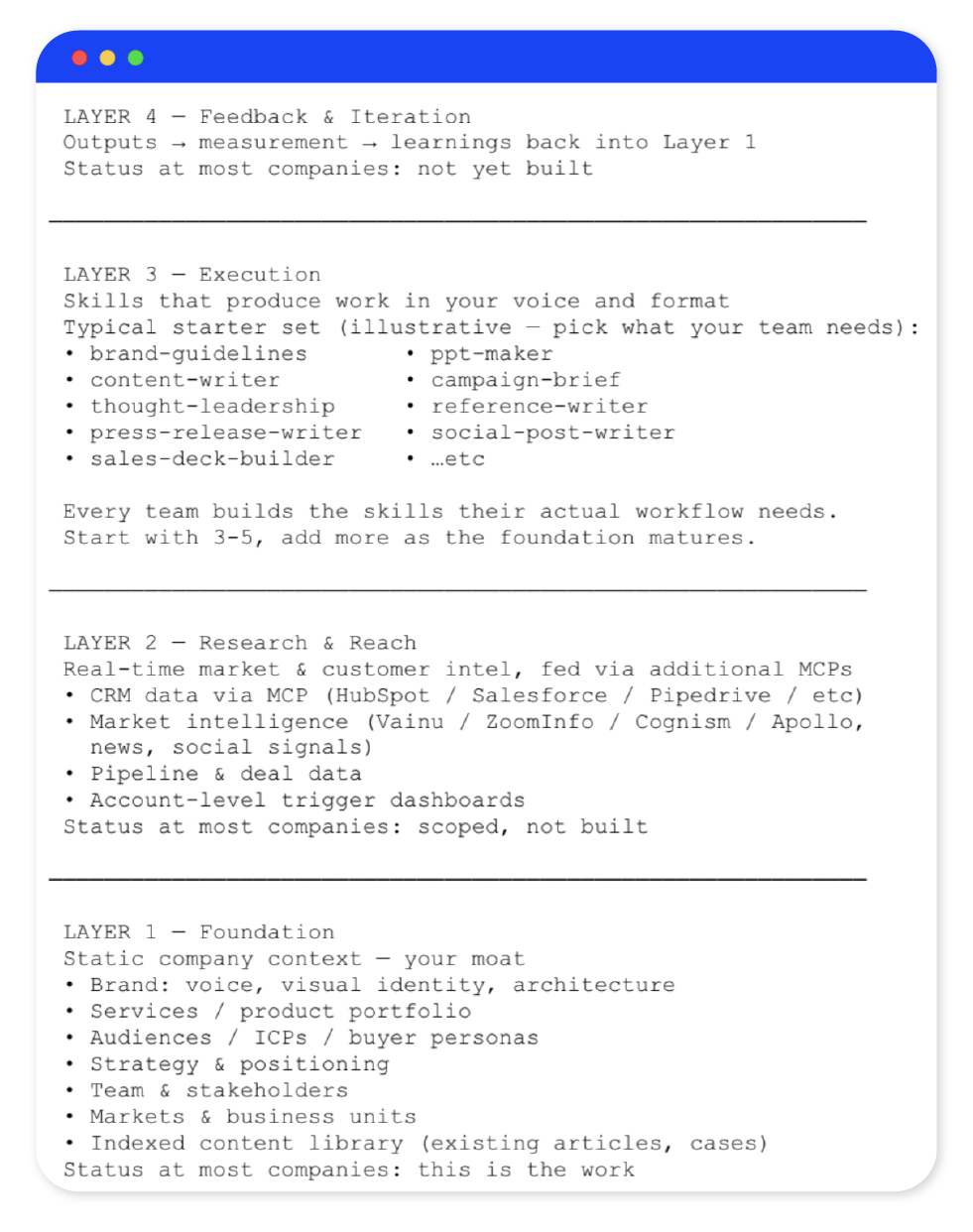
Kieran Flanagan’s four-layer model inspired the structure of Joni’s Marketing OS, the AI brain sitting between his marketing team and Claude.
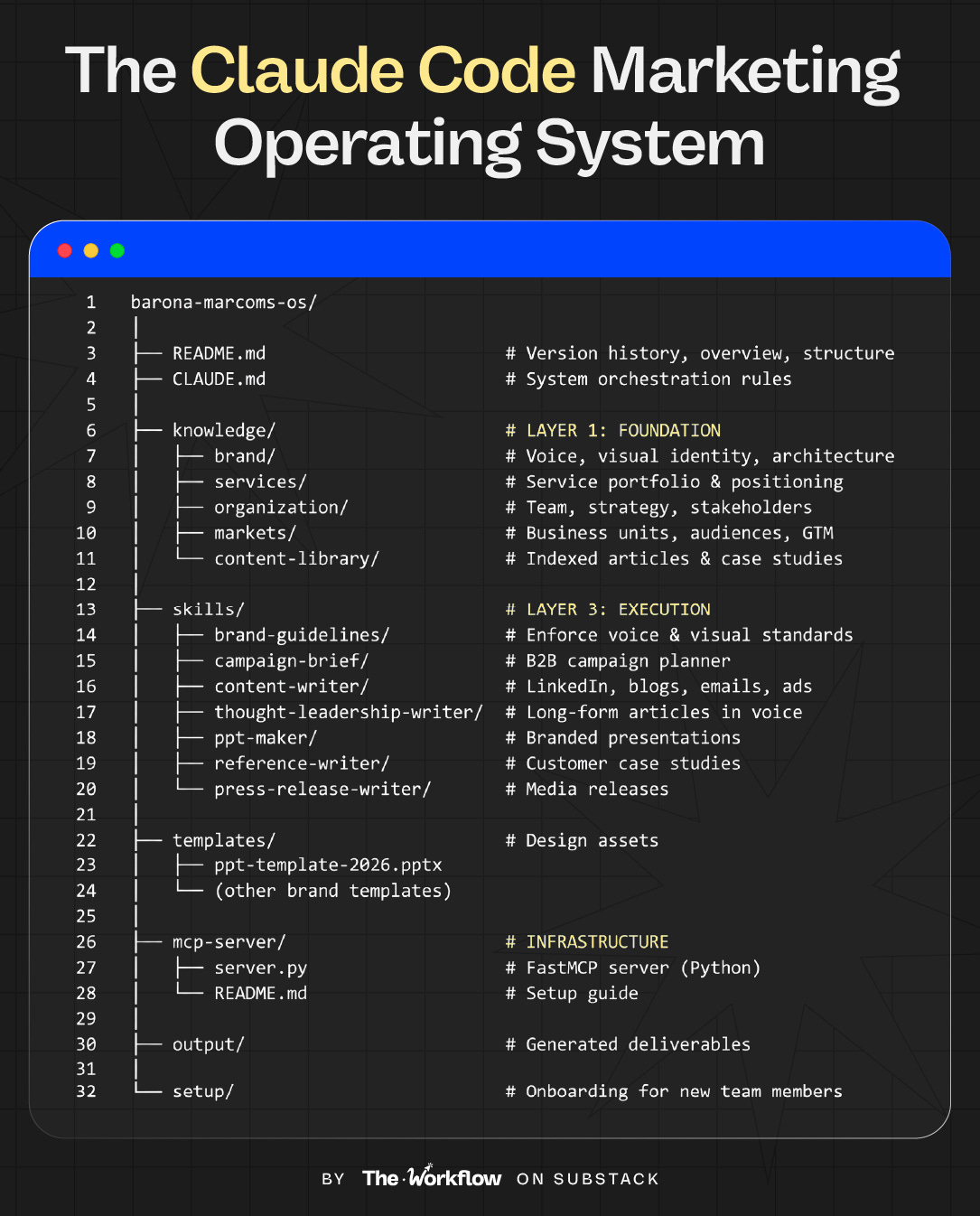
Layer 1 (company foundation) is the static context: positioning, ICP, products and services, tone of voice. These are persistent, long-lasting elements that rarely change.
Layer 2 (research & reach) gives the system legs: it plugs real-time data into the system via MCPs: CRM signals, market intel, performance data.
Layer 3 (execution) is where output gets produced: campaign briefs, LinkedIn posts, decks, press releases. It reads from Layer 1 and generates first drafts that fit the brand’s tone of voice and processes.
Layer 4 (feedback loop) is the self-reinforcing layer that makes the system smarter over time.
Just a couple of months in, Joni has layers 1 and 3 running. Layer 2 is scoped. Layer 4 is on the roadmap. This order is key and you’ll learn why in a sec.
Step 1: Plan your system layer by layer
Claude Code is hella intimidating for most non-technical people. Our first issue on Claude Code is a great place to start before diving in.
The first step has nothing to do with building. Before writing a single markdown file, get clear on what you’re documenting. “The system is only as good as what you feed it.” This is not a machine worth building if you haven’t done things “by hand” for a while and don’t know what great looks like.
Start with layer 1 (company foundation), move to layer 3 (execution), and tackle layers 2 and 4 last. Layers 1 and 3 alone will cut a campaign brief from two hours to thirty minutes and ensure everything you put out is on brand. Layers 2 and 4 are only worth building once the foundation is solid and the team is shipping work regularly.
“This OS looks insanely complex but it really isn’t. I’m not a technical person. What will really make this machine excel is the business context and the knowledge only you have as an operator. Anyone could build the system itself,” Joni told us.
👉🏼Download Joni's starter kit, unzip it, open Claude Code inside the folder, and start from the README.md. It will guide you through building your own Marketing OS from scratch.
Step 2: Build your foundational layer (layer 1)
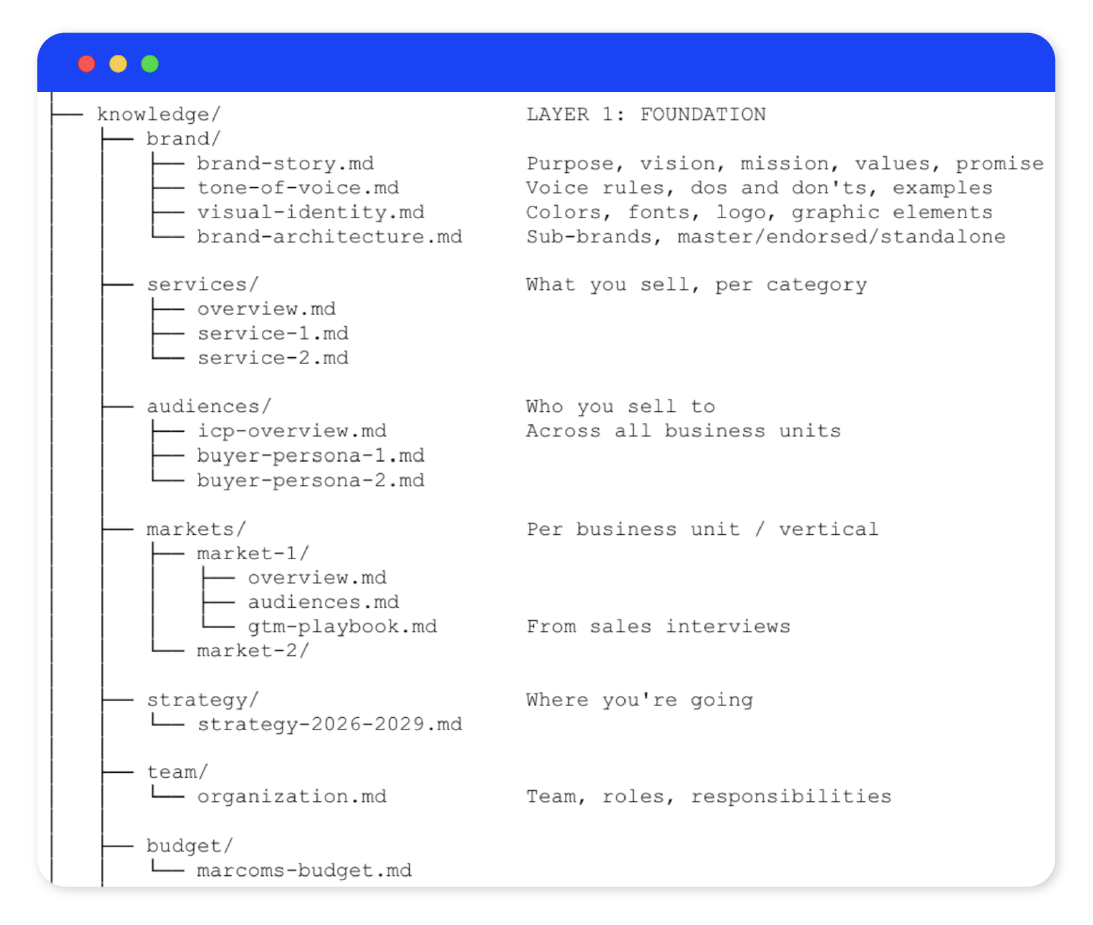
Layer 1 is the system’s knowledge base. Thanks to it, every output starts from the same shared understanding of who the company is, who it serves, and what it should sound like.
Your foundation layer contains:
Brand: tone of voice, brand story, visual identity guidelines, brand architecture.
Services or products: what you sell, how you describe it, proof points, pricing logic.
Audiences: ICPs, buyer personas by role, pain points, jobs to be done.
Strategy: marketing strategy, business strategy, where the company is headed.
Markets: per business unit or vertical, GTM playbooks, stakeholder maps.
Content library: a folder of your best existing articles, case studies, and LinkedIn posts. The system reads these as reference examples when producing new content.
The good news: if this documentation already exists somewhere in your company (it does, right? Right?). Whether it’s in a brand book, a Notion doc, people’s brains, or a shared drive, you can convert it into .md files with Claude Code.
If it doesn’t exist, now is the time to create it. “AI will expose every gap in your marketing foundation.” Joni told us. “Suddenly people realize: my God, I actually don’t really know who our customers are.”
This layer takes months to build properly, and to be honest, it will never be fully done. New services come in. Strategic priorities shift. Markets evolve. Think of it as a living document with a slow update cycle, instead of a one-time project.
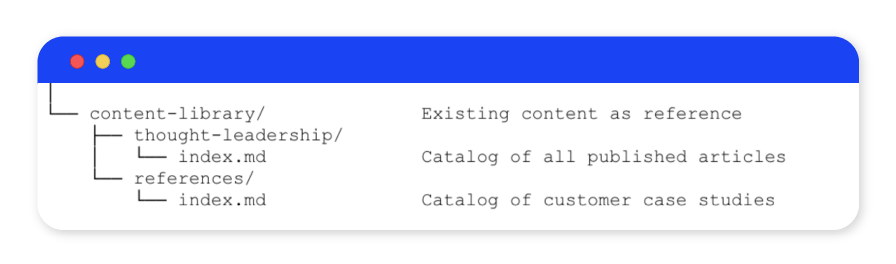
Within this layer, the content library is a folder containing your best work: published articles, case studies, LinkedIn posts. The system reads these as reference examples when producing new content. Ten to fifteen of your best pieces are enough to start.
“The real moat is the structured business context that feeds the AI,” Joni told us.
👉🏼 Create your own Marketing OS with Claude Code: Download Joni's starter kit, unzip it, open Claude Code inside the folder, and start from the README.md. It will guide you through building your own version from scratch.
Step 3: Set up the technical scaffolding
This is the step that sounds like the worst horror story to most non-techies, but stick with us for a second. Despite not being a developer, Joni built the entire technical setup himself, with Claude Code doing most of the heavy lifting.
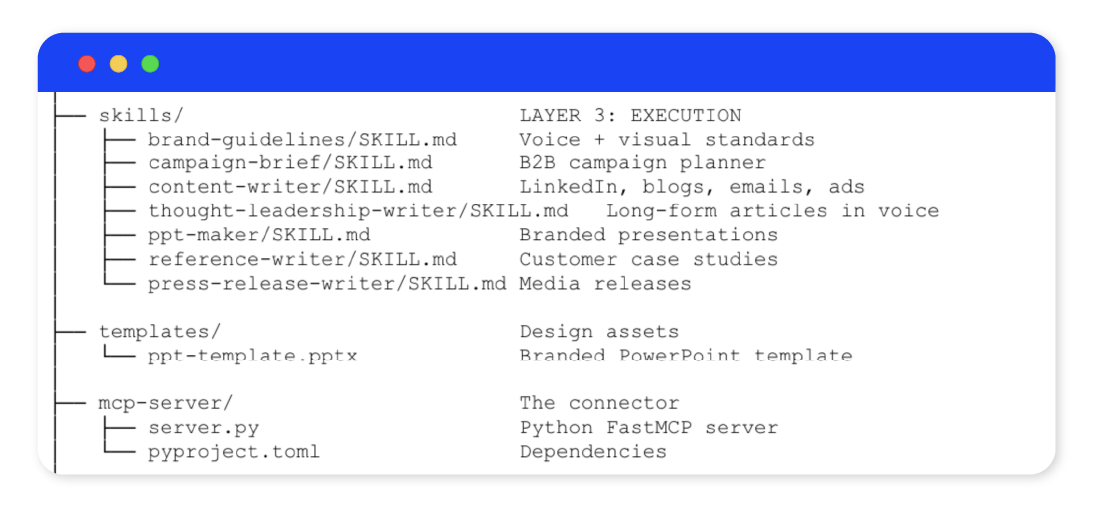
The Marketing OS lives in a private GitHub repository. This is the single source of truth for everyone on the team containing foundation files, skills, content templates, and the MCP server that connects it all to Claude Desktop. The folder structure looks like this:
knowledge/ — your layer 1 foundation files
skills/ — your layer 3 execution skills
templates/ — design assets (PowerPoint templates, etc.)
mcp-server/ — the Python server that connects the repo to Claude
setup/ — onboarding instructions for new team members
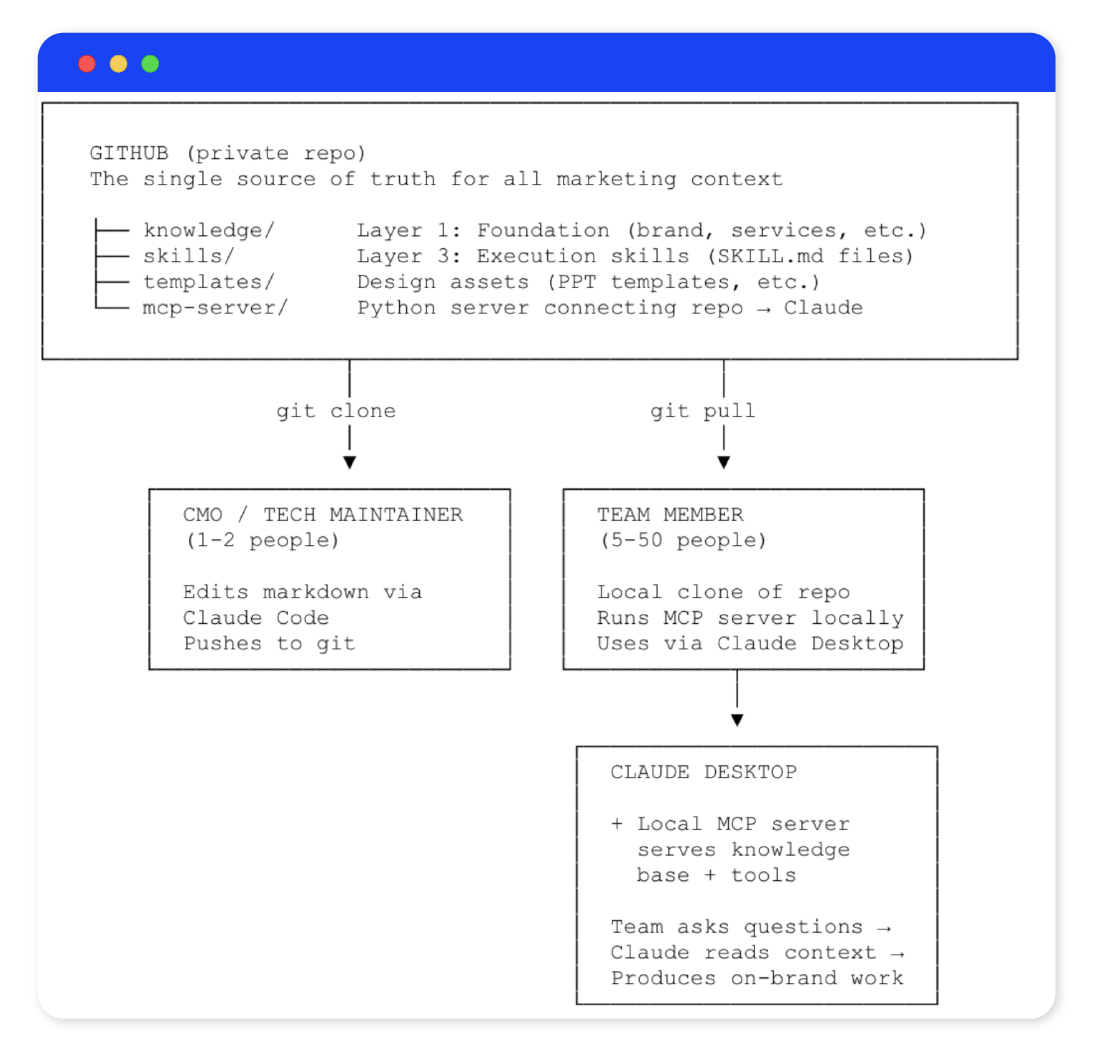
The MCP server makes the system queryable. It runs locally on individual laptops, which means there is no central server to host, no uptime to manage, and no infrastructure cost. Storing everything in GitHub also means every change is tracked, and old and new versions never get mixed up.
The day-to-day flow looks like this:
Joni or one of the two other admins edits markdown files via Claude Code and push them to GitHub
All other team members clone the repo locally and run the MCP server on their own laptops
They open Claude Desktop, which connects to the local MCP server, and start querying it
“I’m not an engineer,” clarified Joni. “I’m just testing whatever works, with tons of curiosity, and building from there.”
One governance decision before you launch: who edits, who queries. Joni keeps edit rights to himself and two others. Everyone else uses Claude Desktop. Giving the whole team edit access is how you end up with a brand identity crisis.
👉🏼 The starter kit includes the full repo structure and the MCP server setup. The README.md will guide you through the setup and make this feel less intimidating.
Step 4: Turn your key tasks into Claude skills (layer 3)
Now we’re finally putting the system to work. Skills are markdown files that tell Claude how to handle specific tasks: what to produce, how to structure output, which tone of voice rules to enforce, and which parts of the foundation layer to read from.
Start with three to five skills that replicate your team’s most frequent tasks and processes. Joni’s starter set looks like this:
brand-guidelines — enforces voice and visual standards across any output
campaign-brief — builds a full campaign brief from a short input, reading strategy, audiences, and services from layer 1
content-writer — drafts LinkedIn posts, blog articles, emails, and ads in your brand voice
thought-leadership-writer — interviews the author first to capture their personal voice, then produces long-form content in that voice
ppt-maker — generates branded presentations using your PowerPoint template from the templates folder
reference-writer — drafts customer case studies from interview notes
press-release-writer — produces media releases in your house format
Don’t try to build all of these at once. Pick the three that would save your team the most time and start there. Add more as the foundation matures.
An important tip: keep skills focused and give them just one task. Broad skills produce broad output.
The thought leadership skill is Joni’s favorite creation. Rather than just asking the person to describe their voice, the skill interviews them first, extracts their point of view, tone of voice, and topics, and then uses that as additional context on top of layer 1. The result is a draft that sounds like them, while still taking into account the broader company context.
“Bad marketers plus this system equals faster bad output. Good marketers plus this system move mountains,” Joni told us. “Automate the assembly line, not the design studio.”
Step 5: Roll it out to your team
If there is no team adoption, this system is as useful as a Notion doc last updated in 2021.
Onboarding a team member to the Marketing OS takes around 15 minutes: clone the repo locally, run the MCP server on their own machine, and connect to Claude Desktop.
The day-to-day flow from there goes like this:
A marketer opens Claude Desktop and prompts: “Write a LinkedIn post announcing our new [service / case study / campaign]”
Claude calls the relevant knowledge tools, reads the tone of voice file, pulls the right audience and service context from layer 1, and produces a first draft
The marketer iterates: “make it punchier”, “add a stat from the GTM playbook”
They take the 70-80% draft and finish the last 20-30% themselves
Another underrated benefit of this system is how much it has sped up onboarding of new hires. Instead of spending their first weeks piecing together how the team operates from outdated Notion docs and whoever has time to answer questions, they get structured, consistent onboarding from day one.
“You can give new marketing team members an AI twin of how your team operates,” Joni told us. “They literally get a queryable senior colleague from day one.”
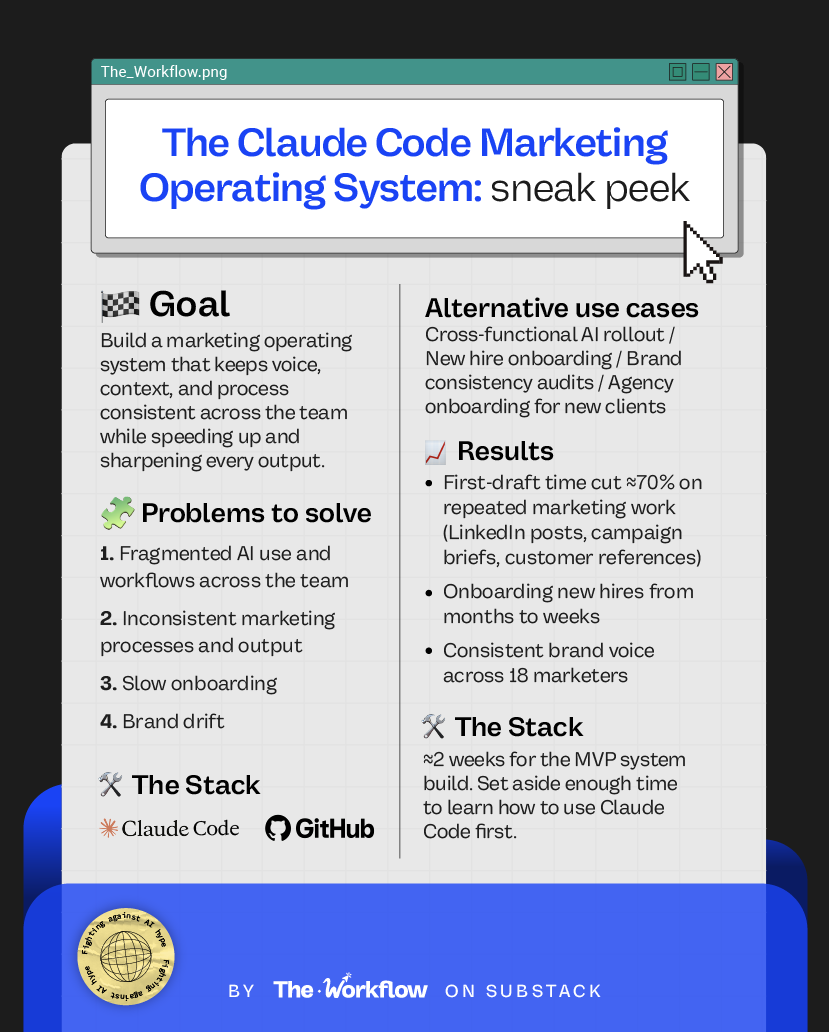
What used to take six months can now happen in a few weeks, without cutting any corners.
Step 6: Tackle the advanced layers (layer 2 + layer 4)
Getting the foundation and the skills up and running is where the immediate value comes from, and also where most teams will stop. Don’t.
The next two layers are what will turn a great internal tool into an intelligent system that gets smarter the more your team uses it.
Layer 2: Research & reach
Layer 2 plugs real-time data into the system via MCPs: CRM signals, market intel, pipeline data, account-level triggers. Where layer 1 tells Claude who you are, layer 2 tells it what is happening right now across your other data sources.
At Barona, this layer is in the making, and Joni’s plan is to connect CRM data, market intelligence tools, and account-level dashboards. When it’s running, skills will be able to produce outputs that are not just on-brand but also timely and tied to revenue.
Important reminder on context management. “Load too much, clog the context. Load too little and it’s generic output again,” Joni warned us. Not every skill needs every data source. A LinkedIn post needs the author’s voice and the market context. It probably doesn’t need the latest CRM pipeline report. Your challenge here is ensuring that each skill pulls only from specific data sources.
Layer 4: Feedback & iteration
Layer 4 is the self-reinforcing loop that makes the system get smarter with usage.
The concept: the team produces output → human in the loop refines it and feeds it back into the marketing brain → the foundational layer is updated with the learnings → each new output is sharper than the last.
To bring this to life, Joni is experimenting with a lesson.md file pattern. Basically, at the end of a working session, team members should log feedback on the output. Learnings get passed to the admins for review, they spar with Claude Code on possible system updates, and push the improvements back into the OS.
To make this layer work, you need to produce enough volume to learn from, which is why it might take a while to get there. Even so, we recommend introducing this feedback habit as soon as possible to avoid the team getting used to ignoring it.
Think about an intern. Would you let them work for three months before giving any feedback and course correcting? The AI brain is the same.
Contrary to popular belief, AI gives time back but also takes a lot of time to implement, review, and maintain. When we asked Joni if he’s answering emails from the pool while his AI agents run his department, he told us: “I wish. I’ve never been as busy as I am today.”
🤖 Tools powering the Workflow
Have you ever seen a leaner stack? We didn’t.
You’ll only need three things.
Claude Code
The tool that builds and maintains the entire OS, from writing markdown files to setting up the MCP server.
GitHub
Where the repo lives. It gives the whole team access to the same version of the system at all times, with no risk of file versions getting mixed up or overwritten.
Patience
An AI marketing brain is not a set-and-forget. It’s a living system you need to keep feeding and refining. Budget for that from day one.
🎢 Highs, lows and Workflow warnings
✅ What shines
First-draft time cut by ~70%
If the foundational layer is strong, the time savings are real, no matter if it’s a LinkedIn post, a campaign brief, or a customer reference.
Brand consistency without an editorial bottleneck
With 18 marketers producing content across B2B, B2C, brand, and comms, consistency used to depend on whoever had time to review. Now every output starts from the same knowledge base.
A queryable senior colleague on day one
New hires used to spend months piecing together how the team operates. Now they open Claude Desktop and prompt. The system onboards them into Barona’s marketing reality, not the version that lives in someone’s head.
⚠️ Workflow warning
Leadership buy-in
Nobody talks about this part, but getting permission to use Anthropic models internally takes time and a clear business case, especially in companies running on Microsoft infrastructure. Data governance is a big topic when introducing a system like this into a company with several users and hierarchies.
Windows onboarding is still rough
The onboarding flow works smoothly on Mac. Windows users still hit more friction.
Broad skills produce broad output
Joni’s original content-writer skill was doing too many jobs at once and the results were mediocre across all of them. The fix was splitting it into a blog writer, a thought leadership writer, and a LinkedIn writer, each with its own instructions. The more specific the skill, the better the output.
✨ The Goldflow
Most people experience learning AI the same way they experience learning a new language. Overwhelming at first, then suddenly useful, then indispensable. Joni describes it as a curve. The bottom feels bad. You don’t know what to learn, what to build, or whether any of it is worth it. Then something clicks, and you start getting addicted to mastering more of it.
The Marketing OS is what “mastering more of it” looks like at an org level. Not one marketer moving faster, but eighteen of them moving from the same foundation, in the same direction, without the CMO having to be in every thread.
“Don’t get lazy with AI and just use it to get basic answers. Use it to build upon your marketing superpowers,” Joni told us.
Turns out, the real foundational layer is the marketer who built the machine, knows why it works, and keeps it smart.
Sara Stella & Diandra ✌🏼
📤 Send this to the marketing leader who thinks buying everyone a Claude subscription counts as an AI strategy
😢 Can’t survive two weeks without us?
Catch up on past Workflows and steal the playbooks you missed.