
The LinkedIn Content Workflow for scaling thought leadership
Create an endless stream of LinkedIn content for founders and executives. AI-powered, but never AI-sounding.
Welcome back to The Workflow, your bi-weekly source of AI and automation playbooks that actually get used in the wild, not just screenshots of 87-step N8N “dream workflows” that never make it past a LinkedIn flex.
Last time, we cracked the code on writing high-converting product-led SEO articles with the ultimate BOFU workflow.
This week, we’re shifting gears across the funnel (and across platforms) to the one channel that’s non-negotiable in B2B: LinkedIn.
If you’ve ever thought, “I should post that,” during a client call and then never did, this one’s for you. Whether you’re a founder juggling back-to-back Zooms, a marketer ghostwriting for execs, or anyone sitting on piles of unused transcripts, we’ve got a system. Calls become spicy takes, spicy takes become drafts, and drafts land neatly in your calendar.
Posting daily on LinkedIn suddenly stops feeling like your second full-time job.
✅ What you’ll learn
How to automate LinkedIn content creation from Zoom call transcripts
How to extract and filter post-worthy topics with ChatGPT
How to turn founder insights into spicy, opinionated LinkedIn takes with Claude
How to build a human-in-the-loop workflow in Slack for authentic content
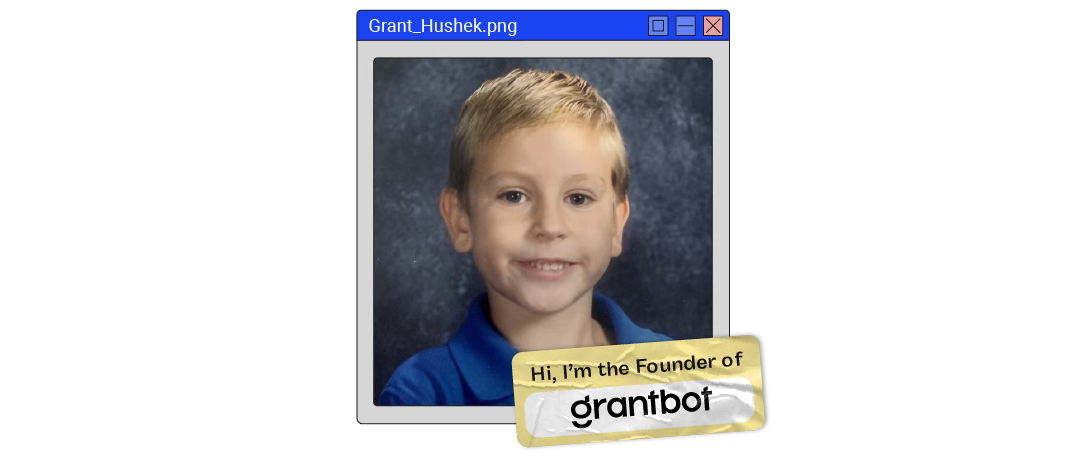
🧨 What triggered The Workflow
Creating consistent LinkedIn content is where most founders stall. Grant Hushek, founder of AI and automation agency Grantbot, was no exception. He lives on Zoom, not in Docs, and the blank page kept winning. “I really needed a draft. I HATE staring at a blank page and creating content from day to day,” he told us. RIP consistent posting, even though the raw material to power his LinkedIn presence was trapped in his many calls.
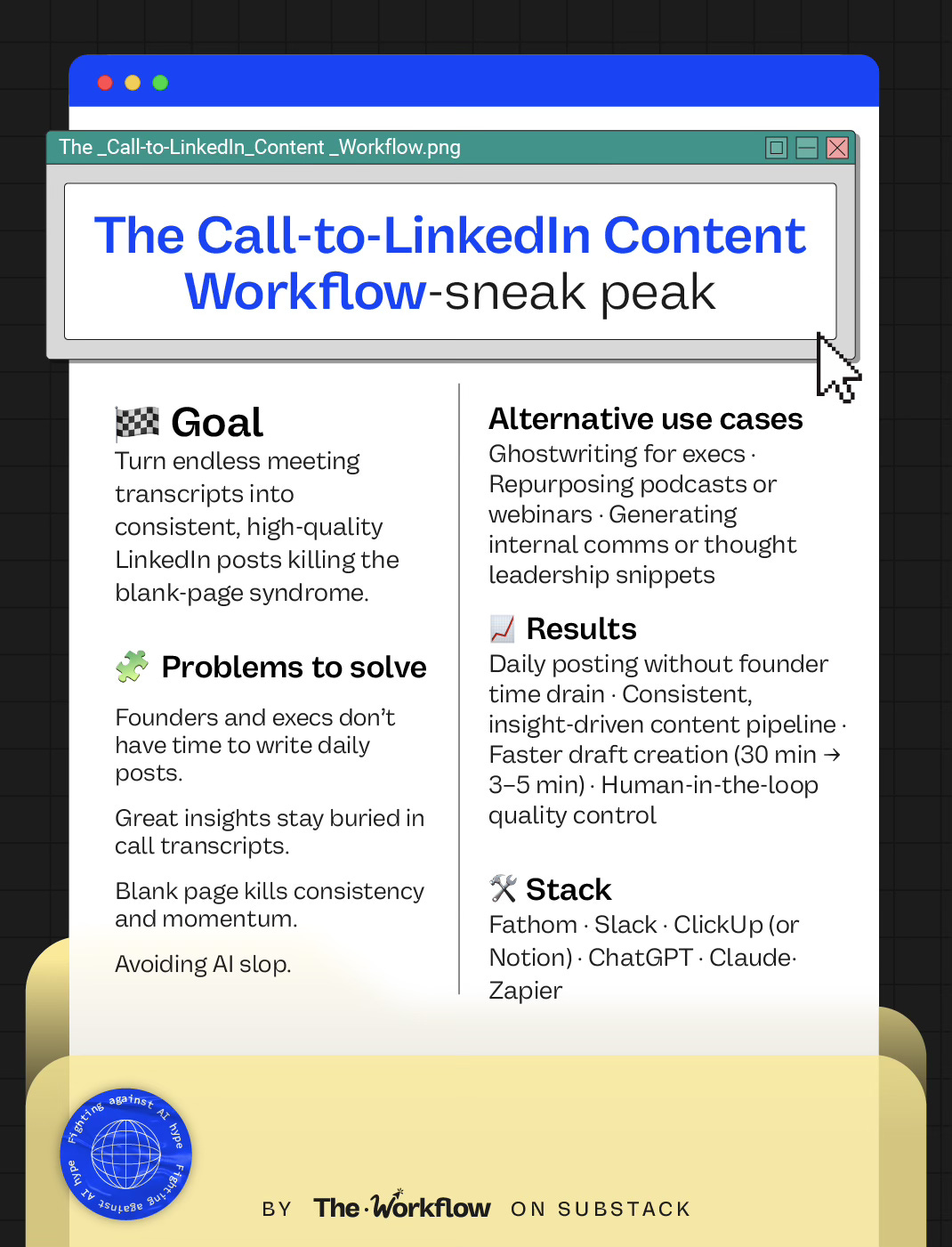
So, he built Call-to-Content to handle a few repetitive jobs: scan every Fathom transcript, pull out the quotable bits, and hand him ‘spicy takes’ to approve in Slack. It’s built for founder-led LinkedIn content, but works just as well for any exec, consultant, or team sitting on a mountain of transcripts. Sounds like AI scale and efficiency, minus the slop.
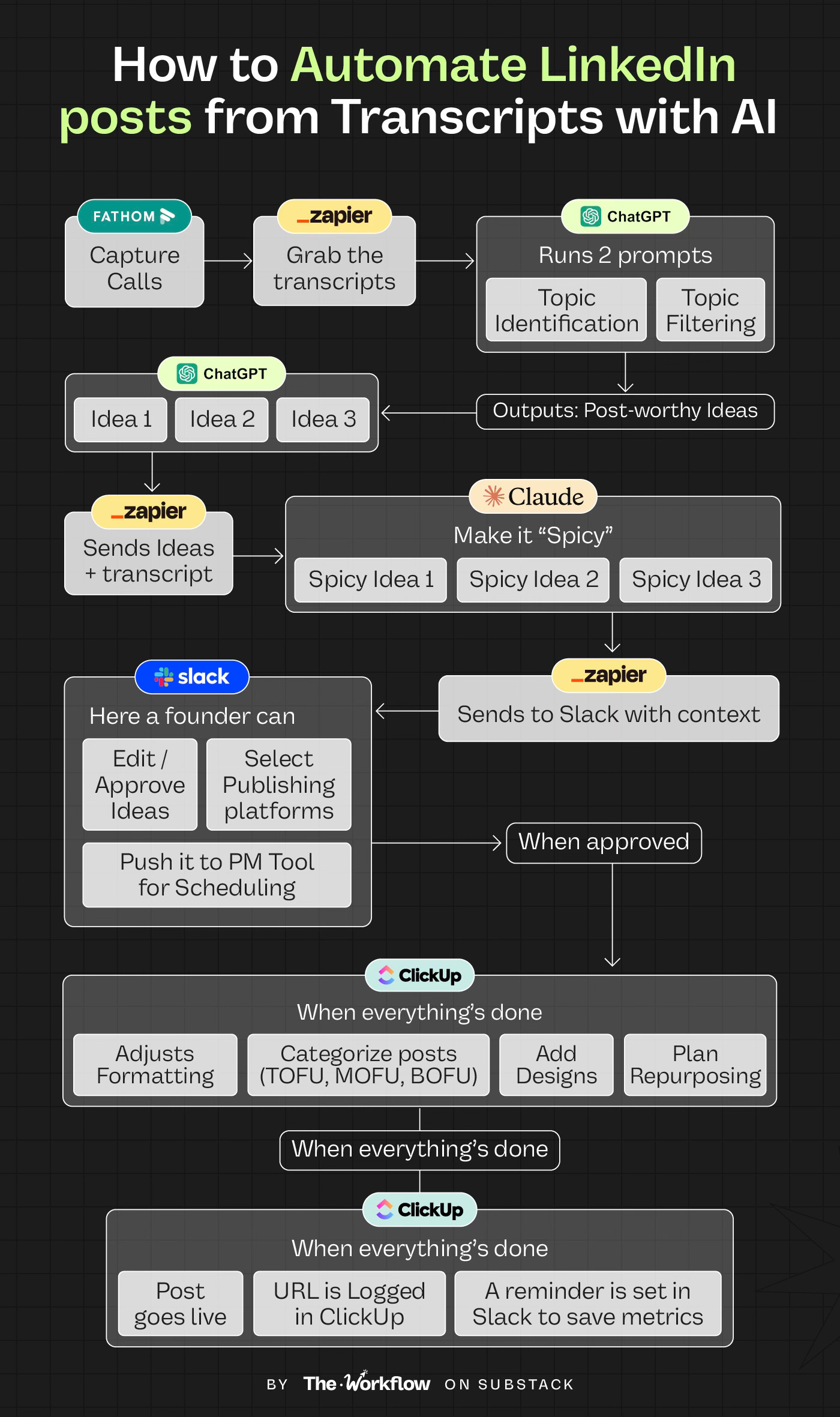
👇🏼 If you think it sounds too good to be true, wait till you see the step-by-step.
🛠️ How to build The Workflow
We’re starting to notice a clear pattern: the best workflows come from solving a personal pain first, then scaling, never from duct-taping 50 AI tools together. Grant’s calls were overflowing with content-worthy insights, but none of it was making it to LinkedIn. “I built this to keep up my LinkedIn game, and then founder friends started asking for it. That’s when I realized others might even pay for it,” he told us.
That’s how his four-step workflow was born: capture & filter, humanize, generate content, schedule.
🎁 Steps 1-3 come with a prompt baked directly into his process (we’ve collected them here.)
As we break down the workflow, we’ll refer back to it so you can see exactly how Grant turns raw transcripts into ready-to-post content in minutes.
Step 1: Capture insights from transcripts
Step one is simple:
Have more meetings than you can humanly handle.
Catch every insight from sales calls, client syncs, and internal stand-ups.
Grant uses Fathom to auto-record and transcribe Zoom calls. From there, Zapier takes over, piping the transcript directly into ChatGPT and running two prompts in sequence:
Topic identification — ChatGPT scans the transcript for unique insights and answers Grant gave in calls that could be perfect post material. It outputs each as a list separated by @ (Grant’s pro tip: AI never uses @ naturally, so it’s the perfect delimiter for Zapier loops).
Topic filtering — ChatGPT takes that raw list and narrows it down to the three ideas with the most viral potential for LinkedIn, again separated by @.
The outcome: a clean, filtered set of three post-worthy ideas that would have otherwise died as “we should post that” moments. Grant 1: blank page 0.
👉🏼 Grab the Topic Identification and Topic Filtering prompts to drop straight into ChatGPT
Step 2. “Make it spicy”🌶
Once the three filtered topics are ready, Zapier ships each into Claude with the original transcript. This is where raw ideas get teeth.
🎯 The “Make it spicy” prompt tells Claude to rewrite the idea as a short, assertive take and fold in any lived experience or data mentioned in the transcript. The result? A 1–2 sentence “spicy take” that actually sounds like something the founder would say. Even with AI in the loop, a distinctive point of view is what makes or breaks a post. Without it, you’re just adding to the LinkedIn noise.
From there, Zapier pipes each spicy take into a Slack channel. Every item arrives with context: the meeting source, the topic, and the draft itself.
The founder (Grant, in this case) can then:
Approve or edit the spicy take directly in Slack
Select the publishing platforms (LinkedIn in this case)
Push it forward into ClickUp (or any project management tool) for scheduling
Grant added: “It was totally worth building an intermediate step to sample the idea before committing to a full post.”
🌶 Grab the “Make it spicy” prompt and paste it straight into ChatGPT or Claude to replicate this step.
3. Content generation
Once the founder approves the spicy take in Slack, it’s time to go from snippet to full post.
AI’s job: Zapier moves the spicy take into Claude, which runs it through two layers. First, it applies tested hook and CTA frameworks to expand the snippet into a full draft. Then the Humanizer prompt reshapes it in a natural, conversational voice; contractions, varied sentence length, casual asides, even small “messy” touches. This keeps the post sounding like the founder, not a robot.
Founder’s job: The draft pops up in Slack. The founder can do a quick edit, approve it, or reroute it to a different platform (LinkedIn, Twitter/X, blog).
Social media team’s job: Once approved, the post lands in ClickUp.
The social media team steps in to:
Adjust formatting
Categorize posts (e.g., TOFU/MOFU/BOFU)
Add visuals, carousels, or design elements
Eventually repurpose to more platforms
This split keeps the founder out of the weeds while making sure nothing reads like it came straight from a bot. We liked Grant even more when he said, “Anything that leaves your company should always have a human in the loop.”
👉🏼 Steal the Humanizer prompt to make sure your AI drafts read like you, not like ChatGPT on autopilot.
Step 4. Schedule and measure
Now that the content is pitch-perfect, the social team sets a posting date in ClickUp. On that day, Slack pings a reminder, the post goes live on the chosen platforms, and the URL is logged back into ClickUp. Exactly 48 hours later, Slack resurfaces the link so metrics can be added and saved for analytics. The loop is closed: content isn’t just shipped, it’s also tracked.
And while you can automate publishing, pretty much any platform still favors human posting. If you have the bandwidth, hit ‘publish’ yourself and drop a comment or two to keep the algorithm gods happy.
🤖 Tools powering the Workflow
Grant runs Call-to-Content on a lean stack: Fathom for transcripts, Zapier for routing, Slack for review, and ClickUp for scheduling. For the LLMs, he splits duties. ChatGPT handles extraction and filtering, while Claude takes over the writing. If you only want to keep things simple, just stick with your LLM of choice. Or, if you’re curious, test the difference by running the other on a free plan. What makes this setup powerful isn’t the tool count but the way it’s wired together: smart prompts, clear use case, and a structure that turns a straightforward stack into a maximum-impact workflow.
🎢 Highs, lows and Workflow warnings
Like every workflow we feature, Call-to-Content has its sweet spots and its breaking points.
✅ What shines
Consistency unlocked: reducing the time spent on each post from 30 minutes to 3–5 minutes with automated spicy takes as the draft.
Distinctive POV baked in: posts sound like the founder because they’re drawn from transcripts, not generic AI fluff.
Human-in-the-loop Slack review ensures content quality.
Scale: one single call produces multiple content angles, creating a backlog of posts to batch and schedule.
❌ What doesn’t shine
Overwhelm: early versions of the workflow generated 5+ posts per call. Grant ended up with 750 drafts waiting in ClickUp.
AI still can’t nail images or carousels. Visuals need a human designer.
Without clear filters, confidential or irrelevant points can sneak in. Approval rounds are crucial.
⚠️ Workflow warning
Hard pill to swallow: this workflow won’t magically create your (or your exec’s) point of view if there isn’t one. AI only amplifies what’s already there: deep knowledge, strong opinions, lived experience. The prompts help sharpen and scale, but they can’t invent substance. And that’s why the Slack review step matters. Skip it, and you’ll be shipping raw AI drafts that read like generic AI slop.
✨ The Goldflow
It’s telling when someone who automates for a living is the first to admit where it falls short. We’d tattoo Grant’s line on our foreheads: “Anything that leaves your company should always have a human in the loop.”
That’s the paradox of today’s workflow: it saves hours by killing the blank page, but its real strength is in the boundaries. No auto-posting, no AI-generated images, final judgment always human.
The other big lesson: founder time is leverage. One hour of conversation can fuel weeks of content. The goal isn’t to go viral, it’s to show up consistently with useful, opinionated takes. In a world of n8n bros flexing 100-step dream automations that will never run, the real power play is simple: keep it human, keep it consistent.
See you at the next Workflow,
Sara & Diandra ✌🏼
🌶 If this workflow saved you from the blank page, pass it on.
🌯 It’s a major wrap
This was the fourth edition of The Workflow, a bi-weekly newsletter by Sara Lattanzio & Diandra Escobar, featuring one real workflow that moved the needle for someone even smarter than the system they built.


This is such a cool and hyper practical workflow! Thanks for diving into the details!
This is high value stuff ladies!! 🙌If someone wanted to pay someone to build this out in their org where would they go?