

The Headcount Audit to back your AI investment decisions
The proven playbook to find your most expensive repetitive workflow, match it to the right size of AI solution, and know the payback period before you spend a cent building it.


Welcome back to The Workflow, the only newsletter that will tell you whether your problem needs a custom AI agent or just a $20 Claude subscription and twenty minutes of your time.
Here's the real problem with AI inside most companies. Everyone agrees AI adoption matters, but nobody owns it.
In bigger teams, it cuts across operations, support, sales, and data, so the initiative belongs to everyone and moves for no one. In smaller teams, everyone is already flat out doing their actual job, so using AI properly stays important but never urgent. Either way, strategic adoption stalls, and the cost of falling behind hides in the hours your team spends on work AI could be doing instead.
Sometimes the move is getting more output from the team you already have. Sometimes it's avoiding a hire you'd otherwise have to make. Either way, the goal is the same: remove the work that shouldn't need a person doing it by hand.
Today’s guest, Cam Trew, ex software engineer, now founder at Headcount, runs this exact diagnostic with his clients before a single AI tool gets bought. It’s called the Headcount Audit.
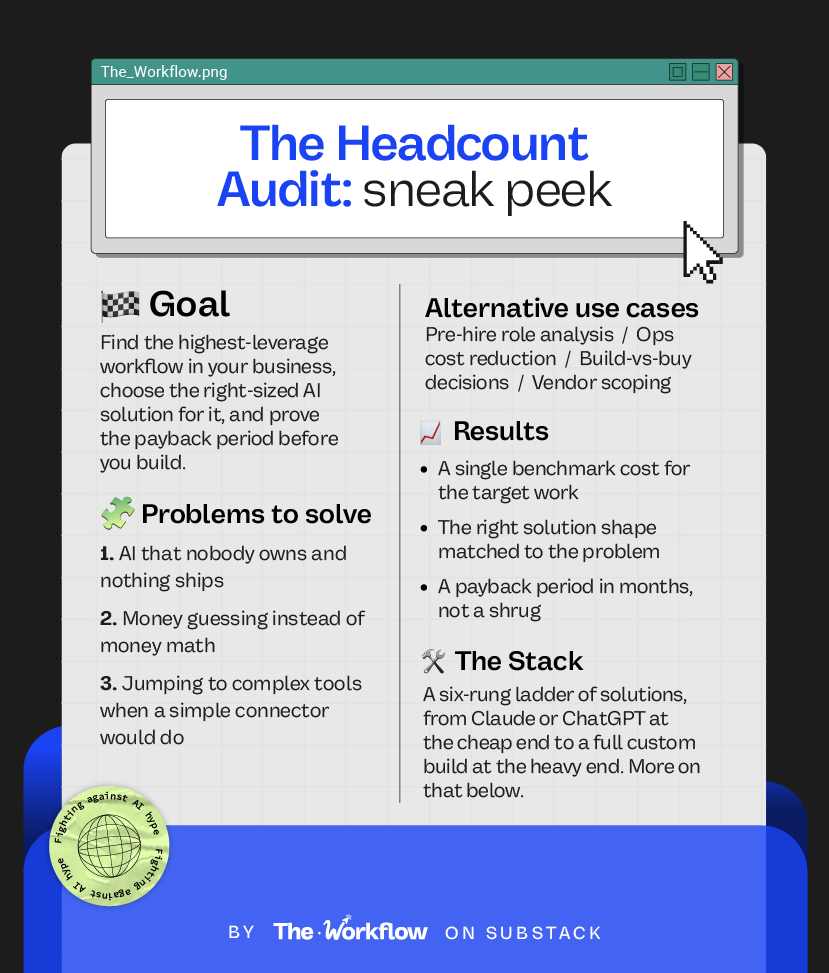
By the end of this issue, you'll have a playbook to find your most expensive repetitive workflow, match it to the right size of AI solution, and know the payback period before you spend a cent building it.
Let’s dig into it👇
✅ What you’ll learn
How to find the one workflow that is bleeding the most time and money, and turn it into a single benchmark number
How to match that problem to the right size of AI solution, from a $20 Claude setup to a full custom build
How to calculate the payback period and treat AI spend like any other investment decision
🧨 What triggered The Workflow
Most AI advice starts with the tools. Pick a platform, build the agent, wire up the automation. That’s starting from the end, and it’s the reason why most AI projects fail.
Cam kept walking into the same scene. Most teams know they should be using AI, so someone gets excited, picks a shiny tool, and three months later, nothing’s fundamentally changed.
No surprise. That’s what happens when nobody quantifies what the work actually costs, nobody watches how it really flows, and nobody matches the problem to a solution that fits. So the project floats on vibes until it sinks.
Cam flipped the order to make sure this wouldn’t happen again. Before any tool, you find the most expensive repetitive work, sit with the people doing it, and put a real number on it. Only then do you choose what to build.
The method goes back to the fundamentals. As Cam puts it, “a company can automate a million things, but it’s the twenty percent that gets you eighty percent of the results.”
The goal isn’t to buy tools and hope. It’s calculating the payback before you start your AI rollout.
🧑🏼💻
🛠️ How to build The Workflow
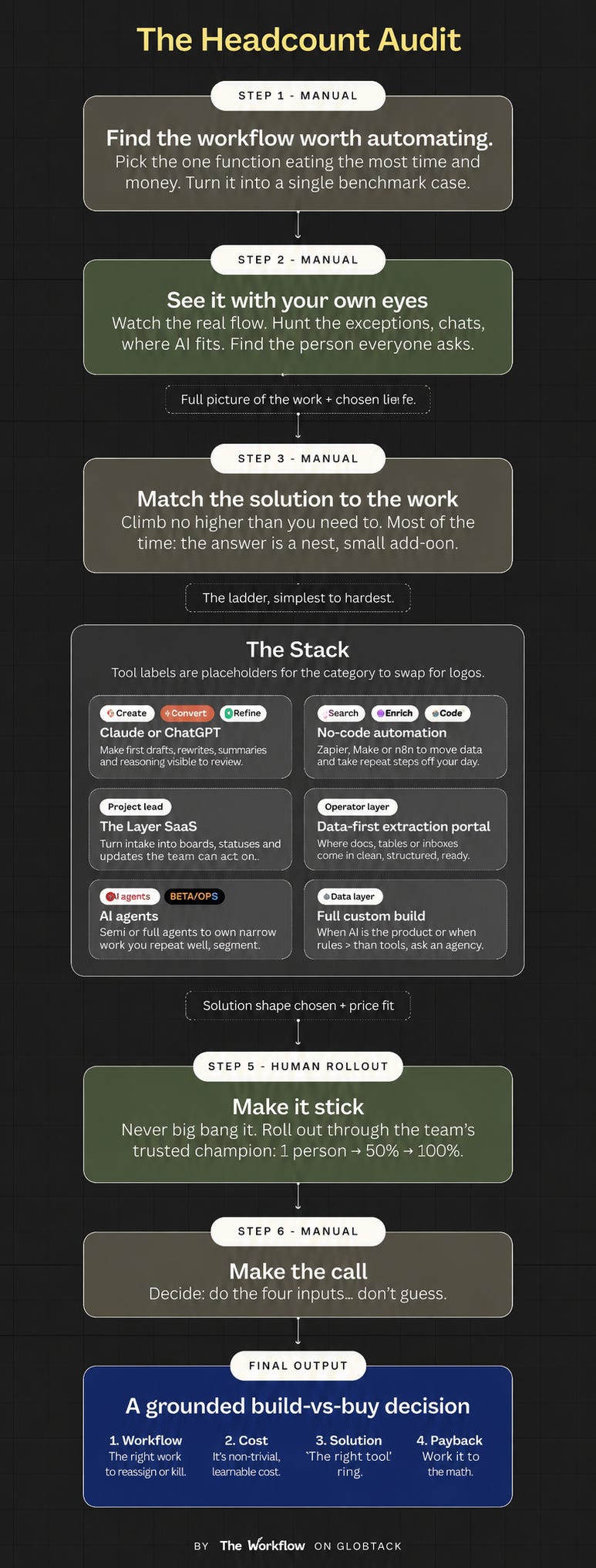
This is a diagnostic, so the “build” is the thinking you do before the building. It runs in six steps.
Step 1: Find the work worth automating
Pick one function to point the audit at. The one you are about to hire for, or the one eating the most time and money. Do not waste the audit on something that saves ten minutes a day. Target what actually pushes the business forward.
How you get there depends on how obvious it is:
If it is already clear, trust what you see and go straight to the maths. You already know your support team is drowning in repetitive work, or your ops team spends half the day re-entering data between systems.
If it is not obvious, get the team logging what they do every day for a week or two. It feels uncomfortable to ask and people get naturally wary of it, but you need the data.
If your business is small (just you and one or two others), skip the logging. You already know where the repetitive work lives.
You're aiming for one number. Take what you pay the team per month, and roughly what share of their time goes on the repetitive work. That's what the work is costing you in total, and it's the input for the payback calculation later. Cam calls it the benchmark: the baseline you compare every future solution against.
Worked example: four people on a support team, each at $4,000 a month, is $16,000 a month. Around 60% of their time goes on phone data entry. That is $9,600 a month on one task. That block is the target.
By the end, you should be able to put this in one sentence: “This function costs this much, and a real chunk of it is time my team shouldn't be spending this way.”
Step 2: See it with your own eyes
Numbers tell you where the cost is, but what they don’t tell you is how the work flows or where it breaks. For that, you have to watch it happen.
As Cam says, “how a process is supposed to work and how people actually do it every day are two completely different things.” The gaps are what you’re hunting.
Every process is data coming in, getting handled, and data going out. Look at these two components:
The main flow. The 80% that comes in one way and leaves another way, day after day. Email addresses enter CRM, customer calls are logged into a ticket system.
The exceptions. The cases that need custom paths. An email comes in that needs a second team, then a phone call comes in chasing the same thing, and now it’s two channels, two teams, and someone has to stitch it together.
This matters because of one key rule: “AI doesn’t fail on the bulk of the work, it fails on the exceptions.” This is the biggest risk, so focus on this one.
During your observation, do three things.
The price of an error. A mistake in a support ticket costs less than a mistake in a contract or a compliance form. The higher the cost of an error, the more a human needs to stay in the loop, and that shapes which solution you choose in step 3.
What the people doing the work find truly painful. They’ll tell you if you ask directly. The goal is to remove the part of their job that grinds them down, not the judgment calls that actually need them.
The go-to person. Every team has one, and every problem eventually lands on their desk. Find them early. They know where every edge case lives, they're your best source of truth during the observation, and they become your rollout champion in step 5.
You’re not designing anything yet, just building the full picture.
Step 3: Match the solution to the work
This is the hardest part. The job is to match the problem you just mapped to the simplest solution that will move the needle. The philosophy: people get hung up on the latest tech and building armies of agents, but most of the time, the answer is just “a neat, small solution that joins two systems together and removes the painful work.”
Here are six possible solutions, from the simplest to the most complex. Which one feels more appropriate for your case and why?
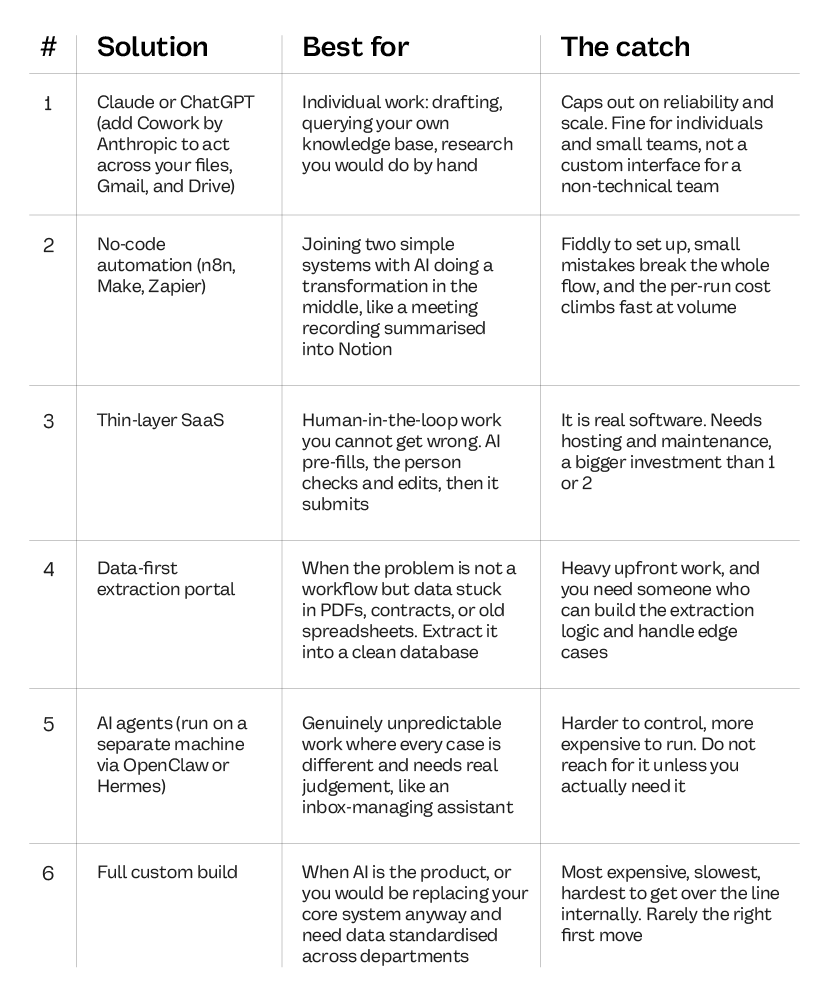
Two things to weigh across all six.
Your data. The question is not whether yours is messy, since modern AI systems can handle that. The question is whether AI can process your data at all. If it is locked in PDFs or scattered across systems that can’t communicate with each other…we have a problem to solve.
The human in the loop. The higher the cost of a mistake, the more a human stays in the loop, and that alone rules some solutions out.
Worked example, continued: for the support team, the input is calls and emails (unpredictable, varied), the output is precise CRM records, and there’s a lot of judgment in the middle. That combination points to a thin-layer SaaS.
Here’s how it works: AI takes the unstructured input and pre-fills the fields. A human checks, edits, and submits. That submission hits the CRM via API. The human stays in the loop at the moment that matters most, which is exactly what gives you reliable output.
A plain Claude setup doesn’t work here because the team isn’t technical and needs a proper interface. No-code breaks down because the input is too variable and edge cases will bring the whole flow down. An agent is overkill and removes the human checkpoint. A full custom build is far too expensive for what is essentially a connecting layer.
Step 4: Run the numbers
Now it's time to put a price tag on your AI solution. Talk to development teams and agencies, or figure out if it makes sense to build it in-house. Whatever the route, you need a number to get this live, and you need someone you trust to build it.
Then run the calculation: build cost divided by monthly net saving equals months to pay it back.
Worked example, finished: the data entry costs $9,600 a month. AI halves it, saving $4,800. Build cost is $30,000, running cost $500 a month, so the net saving is $4,300. $30,000 divided by $4,300 is roughly seven months to pay it back. After that it's net saving every month.
Once you can see a number like that, the conversation changes. It's no longer a tech decision. It's a business investment decision.
Step 5: Make it stick
This is where most projects break. Never big-bang it. You don’t want the whole team adopting on day one and hitting issues you never caught.
Remember the person everyone already asks from step 2. They’re now your rollout champion. Build the solution with them and let their input shape the solution as well. They’ll be invested because they helped build it, and because it makes their job easier.
Then test it with them first. Let them use it every day until they’re happy with the output. Once they are, roll it out in stages
One person for a week. They find things, you fix them.
Then 50% of the team. See how it holds.
If it’s still solid, 100%, with a fallback in case something breaks.
Within two to four weeks you’ll know if it works. “It works” means two things: the team uses it without falling back to the old way, and the output is at least as good as before. If either isn’t true, don’t expand.
When you scale from one person to 50%, your champion onboards the new people. They’ll teach it better than any documentation, which is the whole reason you built it with them in the first place.
Step 6: Make the call
You now have the four things you need: the highest-leverage workflow, its monthly cost, the right AI solution, and the payback period. That's enough to make a confident decision.
👉 Cam walks you through the Headcount Audit, with worked examples and templates, in his course here.
🤖 Tools powering the Workflow
The Headcount Audit is tool-agnostic. The stack is whatever sits at the right rung of the six-step solution ladder from step 3, and Cam’s advice is to go no higher than the problem actually requires.
Claude / ChatGPT (+ Cowork) for individual and small-team work, roughly $20 a month, and live in an afternoon.
n8n, Make, Zapier for connecting two systems with AI in the middle.
Thin-layer SaaS when you need a human checkpoint you cannot skip.
OpenClaw or Hermes when, and only when, the work is unpredictable enough to need an agent.
Stop focusing on the tools and start finding the simplest solution to solve your problem.
👉 Cam's full method, with templates and worked examples, is in his course.
🎢 Highs, lows and Workflow warnings
This is a method, not a product, so the trade-offs live in how you run it.
✅ What shines
It kills the “I don’t know” answer. The audit exists to replace a shrug with a number. You walk into the room able to say what your AI implementation will cost and when the build will pay back.
It defaults to small. The six-rung ladder is built to push back on shiny AI object syndrome. “Most of the time, the answer is a neat, small solution that joins two systems together,” says Cam. That bias against complexity is the most valuable thing here.
❌ What doesn’t
It is only as good as your time data. If the team fudges the logging in Step 1, or you eyeball the percentages, the benchmark is soft, and the payback maths will inherit that softness.
The hard part stays hard. Choosing the right solution in step 3 is still a difficult call. The framework helps narrow it down, but it won't make the decision for you. Get the shape wrong and you can overbuild a connector or underbuild something that needed a human in the loop.
⚠️ Workflow warning
Watch the agent itch. The most expensive mistake in this process is reaching for rung five when rung two would do. Agents are harder to control, cost more to run, and most problems don’t need one. As Cam puts it, “don’t reach for this unless you actually need it.” The full custom build carries the same warning, only louder.
✨ The Goldflow
The bottleneck in most companies is ownership. AI implementations stall because the initiative belongs to everyone and therefore no one feels accountable for moving it forward. This audit works because it forces someone specific to own a specific number.
That number does more work than you might think. Once a workflow has a monthly cost and a months-to-recoup figure attached to it, the conversation stops being an opinion. “Should we invest in AI?” is an unanswerable question. “Is seven months a good return on this?” isn’t. Operators know how to answer the second question. The audit just makes sure they’re finally being asked it.
Sara Stella & Diandra ✌🏼
🧾 Know someone about to drop $50k on an "AI transformation" with no payback math? Forward this before they sign anything.
😢 Can’t survive two weeks without us?
Catch up on past Workflows and steal the playbooks you missed.
🧠 The Claude Code brain for AI-native marketing teams
🦞 The OpenClaw Research Workflow to catch viral news before LinkedIn does
😴 The Content Repurposing Workflow that runs while you sleep