

The OpenClaw Research Workflow to catch viral news before LinkedIn does
The autonomous AI agent that drafts your LinkedIn newsjacking posts before you wake up

Welcome back to The Workflow, where we trade AI hype for things that actually ship.
Newsjacking is the fastest way to grow on LinkedIn right now. You take something that just happened in your industry, add your take before anyone else does, and you borrow the audience the news already has.
The problem has never been writing the post. The problem is finding the right story at the right time, fast enough to matter. By the time a story trends on LinkedIn, it already broke on X days or even weeks ago.
So I built something that fixes the bottleneck. An AI agent that lives on a server, runs 24/7, scrapes the web for me, and lands ready-to-edit drafts in my Slack before I open my laptop.
Even on the days we don't end up posting, we open Slack and are already caught up. The agent doubles as our morning industry brief.
Today I’m walking you through how to build it. Plus two simpler versions if you want the same outcome without spinning up a server.
✅ What you’ll learn
Why newsjacking is one of the growth formats carrying LinkedIn right now
How to deploy an autonomous AI agent on Hostinger in 15 minutes
How to wire it to Slack or Telegram so it feels like a team member
How to prompt it to surface real stories and draft real posts
Two simpler backup versions if the agent route feels like too much
🧨 What triggered The Workflow
One of Distinctiva’s clients covered the story about ChatGPT pulling directly from Google search and what that meant for SEO strategy. 208,000 impressions. 293 comments. 234 reposts.
That post worked because we were early. No one else had talked about it (yet).
The problem with timing is that it doesn’t scale. You can’t sit on X and Google News for an hour every morning scanning for the right story across multiple clients. You’ll always be late, or you’ll burn your best thinking time on research.
So I kept experimenting. First with Claude Cowork. Then with n8n. Both worked, both had trade-offs.
Cowork runs on a schedule, but your laptop has to be on. It also researches through Google, so if a story breaks on X first you can wait a couple days for it to get indexed. n8n scrapes X live and runs without you, but it’s more setup: API keys, the X scraping config, the workflow nodes.
Then I tried OpenClaw and something clicked. I gave it the task once and it ran itself on a server. Same research, zero babysitting.
🗞️🔥
🛠️ How to build The Workflow
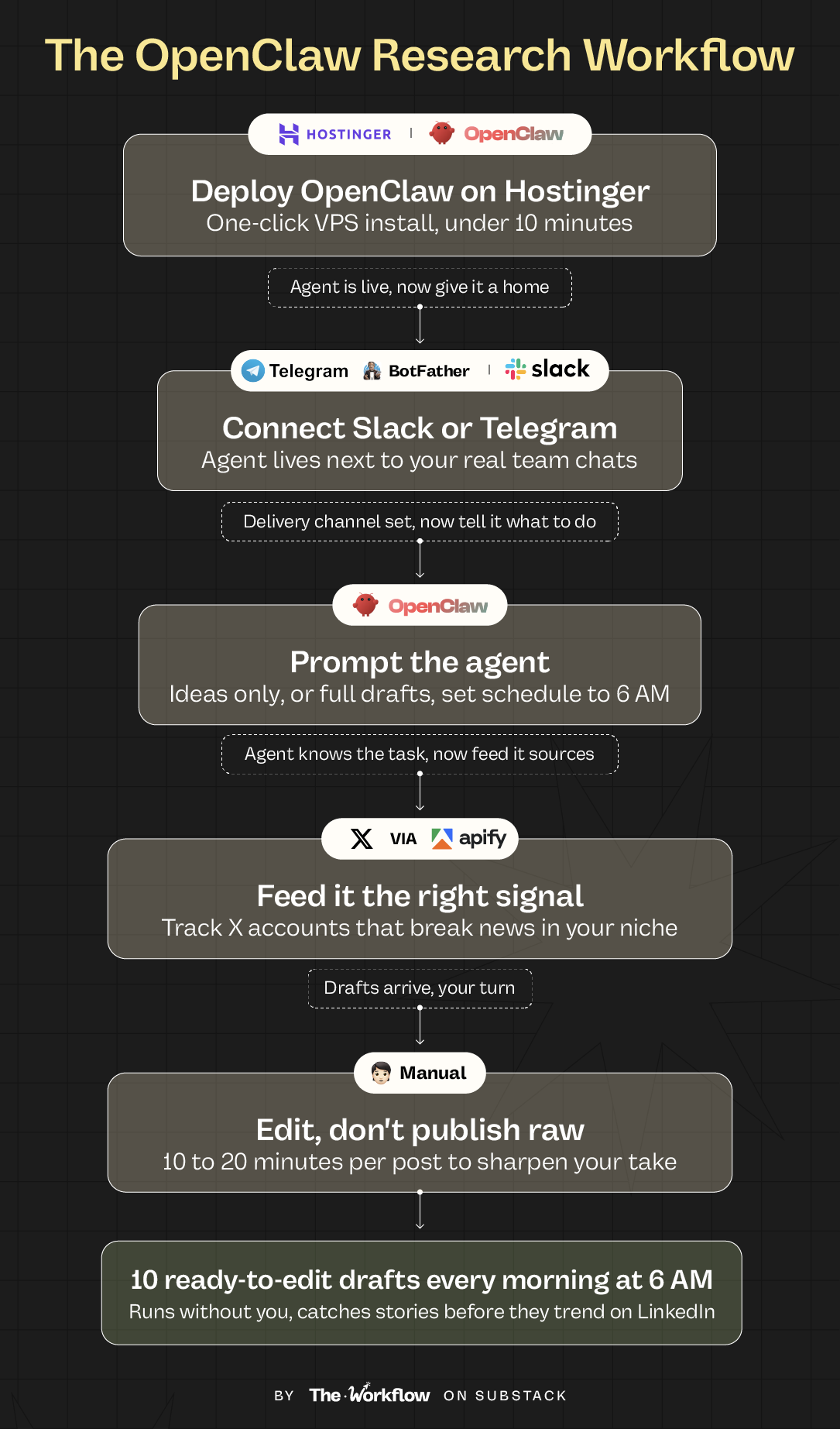
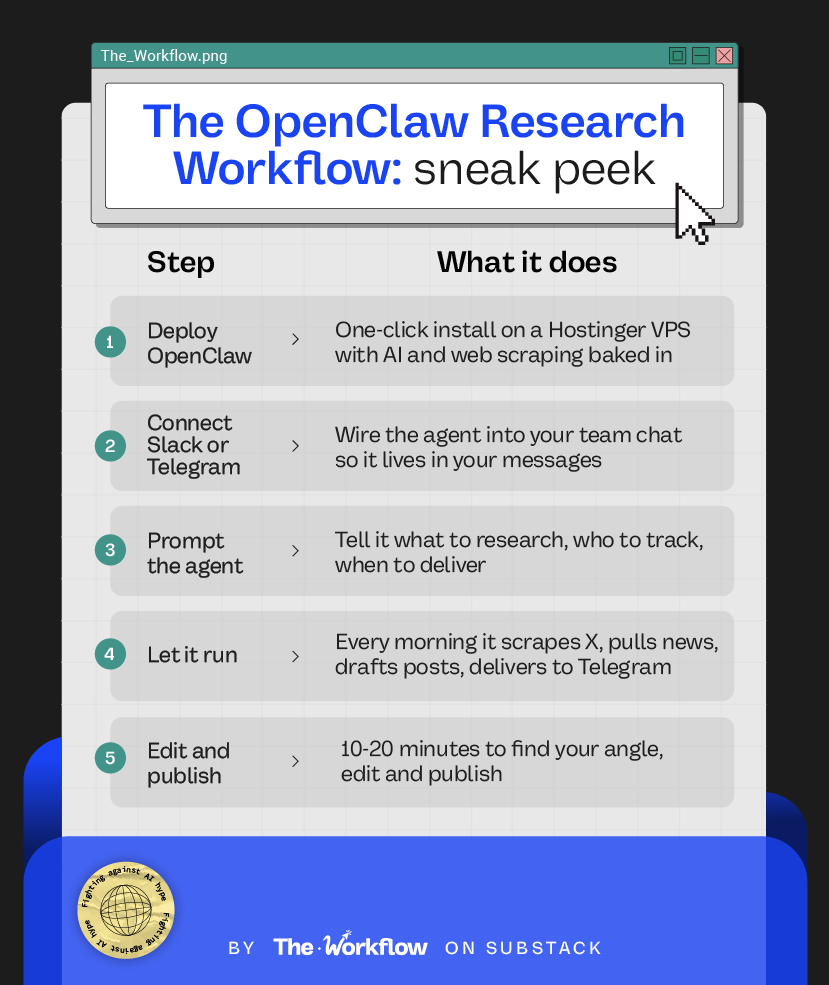
Step 1: Deploy OpenClaw on Hostinger
OpenClaw is an AI agent platform. Unlike a workflow tool, you don’t build nodes or configure triggers. You give it a task and it figures out how to execute, which tools to call, and when to run.
Go to Hostinger and find the one-click OpenClaw deploy option. Pick the monthly plan to start. You don’t need to commit to 24 months before you know this fits your workflow.
Enable Ready to use AI. This gives you OpenAI, Anthropic, Google, and xAI built in, so you’re not chasing API keys across four dashboards. Then enable Instant web scraping, which powers the real-time data fetching.
Register, deploy, and leave the default settings alone. Total time from signup to running: under 10 minutes.
Step 2: Connect Slack or Telegram so your agent lives in your messages
The best part of this setup is that the agent doesn’t live in another tab. It lives in Slack or Telegram, right next to my actual team chats. It feels less like a tool and more like an employee who never sleeps.
In OpenClaw, click Gateway Token and open the dashboard. Go to Channels and pick your delivery channel.
For Slack: head to api.slack.com, create a new Slack app, generate a bot token, and paste it into the OpenClaw channel config. Pick the channel you want the agent to post in.
For Telegram: search for @BotFather, type /newbot, give your agent a name and username, then paste the token BotFather gives you into the OpenClaw channel config. Add your Telegram user ID to the user field.
Save. You now have a bot waiting for instructions.
Step 3: Prompt your agent
This is where most of the quality comes from. The prompt determines whether you get 10 usable post drafts or 10 generic AI slop drafts.
👉 Grab both prompts (Ideas Only and Full Drafts) before continuing to the next step.
I run two versions of this prompt depending on what I need that day.
Option A: Ideas only. For when I want to write the posts myself but don’t want to do the research. The agent gives me hooks, angles, and source links. I add my own voice from there.
Option B: Full drafts. For when I want posts I can edit in 10-20 minutes and publish. The agent writes the whole thing following strict rules: short paragraphs, no buzzwords, no em dashes, sentence case only.
Both prompts live in the toolkit I’m linking. You swap in your niche, your X accounts, and your audience, and the agent handles the rest.
Set the schedule to 6 AM Eastern so the drafts are waiting when you wake up.
Step 4: Feed it the right signal
The agent is only as good as the sources you point it at. I track a set of X accounts that break AI news first, before it hits LinkedIn. Accounts like @OpenAI, @AnthropicAI, @karpathy, and @gregisenberg.
Swap these for accounts relevant to your niche. If you’re in fintech, track the VCs and founders posting deal flow. If you’re in SEO, track the practitioners who spot algorithm shifts first.
The more specific your signal, the sharper your newsjacking angle.
Step 5: Edit, don’t publish raw
The drafts won’t be perfect. They never are with any AI tool. Plan to spend 10-20 minutes per post finding your angle, editing, and sharpening the take.
The hour of scanning news sites and X that normally eats your morning is gone. The research is done in seconds, and you're only doing the part that actually needs you.
🤖 Tools powering the Workflow
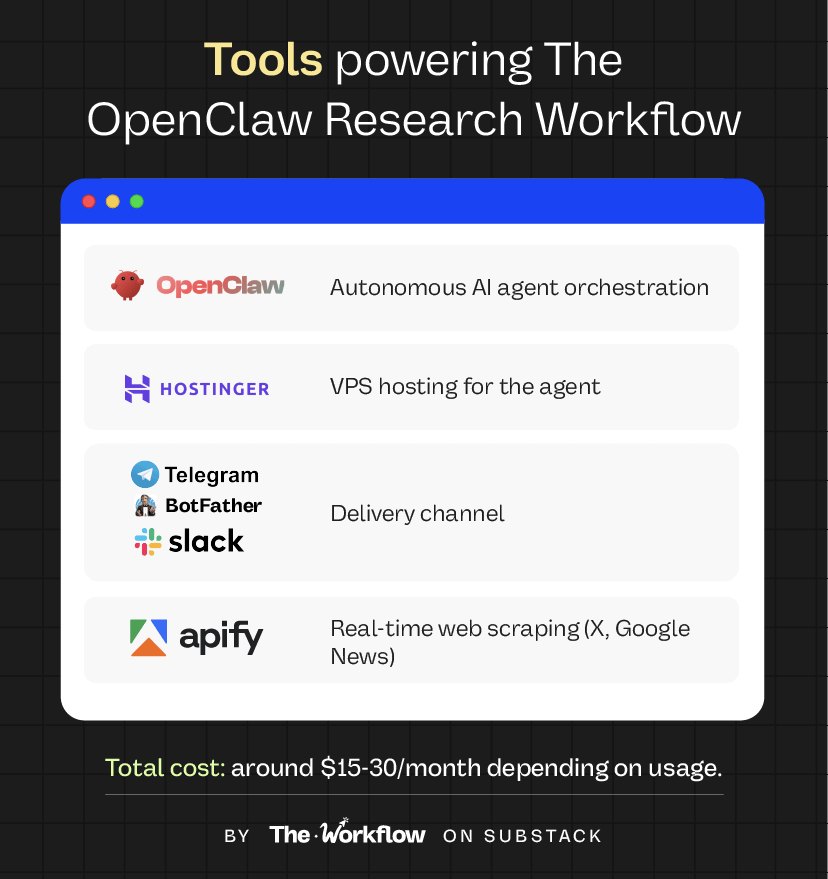
OpenClaw, the agent platform that runs autonomously on a server. Hostinger, one-click VPS that hosts OpenClaw with AI and scraping built in. Slack or Telegram, where the agent lives and delivers your daily drafts. For scraping, use Oxylabs (built into Hostinger, pulls from Google and the web) for the easy route, or wire in Apify if you want to scrape X directly.
🎢 Highs, lows and Workflow warnings
✅ What shines
Runs without you. Your laptop can be off, you can be on vacation, the drafts still land every morning.
Real-time X data. Catches stories hours before they trend on LinkedIn, which is where the impressions live.
Feels like a team member. Sitting in Slack or Telegram next to real humans makes it easier to actually use.
❌ What doesn’t shine
It adds tools to your stack. A VPS, a bot, a server you’re now responsible for. If that’s more infrastructure than you want to manage, there are two lighter versions below that skip the server entirely.
Security trade-offs. You're giving an agent access to data sources and APIs. That needs to be handled with care, especially if you're running this inside a client setup.
Not perfect drafts. No AI tool is. Budget editing time per post or you'll publish robot-sounding content.
⚠️ Workflow warning
Don't skip the prompt we attached. The agent is only as good as the instructions you give it. A lazy prompt gives you lazy output, and the whole point of this setup is skipping the boring part so you can focus on the take.
🪶 Not ready for an agent?
Two simpler versions that get you 80% of the way there
If OpenClaw feels like more infrastructure than you need right now, I also run two lighter versions of this same workflow.
Version 1: Claude Cowork. If you already use Claude, you can set this up in 5 minutes. You give it a prompt, it researches the latest news in your space, and it drops a PDF of 10 drafted posts in your folder or a slack message every morning. The limitation: your laptop needs to be on, and it only researches via Google, so stories that break on X first take a day or two to surface.
Version 2: n8n workflow. More setup, more tools, but it scrapes X accounts directly and runs overnight without you. You import a JSON file, plug in your API keys, and wake up to a formatted email or Slack message every morning with tracked tweets, trending posts, news stories, and 10 drafted LinkedIn posts. This is my pick if you want the real-time edge but don’t want to run an agent.
👆 Not sure which version fits you? I walk through all three in the video.
All three versions are in the toolkit I put together, with every prompt, every config file, and the n8n workflow JSON.
✨ The Goldflow
AI agents take over the part of the job that was never really marketing, the 60 minutes of scrolling X and refreshing news sites for the right story. The take is still yours. The agent just makes sure you're early.
In 18 months, every smart marketer will have an AI agent doing their research. The only question is whether you're one of the people who started early or one of the people catching up.
🌯 It’s a wrap
This issue was a little different. I’m usually on the other side of the interview asking someone else about their workflow. But I’ve been running this one for months and the results have been too consistent to keep to myself.
If you build any version of this, I want to see it. Tag The Workflow on LinkedIn or reply to this email with your results.
👉 Grab the full newsjacking toolkit, every prompt, every config, and the n8n workflow JSON
See you in two weeks with another playbook worth stealing.
Diandra.
❤️ How did you like this issue? Hit reply and tell me.
😢 Can’t survive two weeks without us?
Catch up on past Workflows and steal the playbooks you missed.