

The Content Repurposing Workflow that runs while you sleep
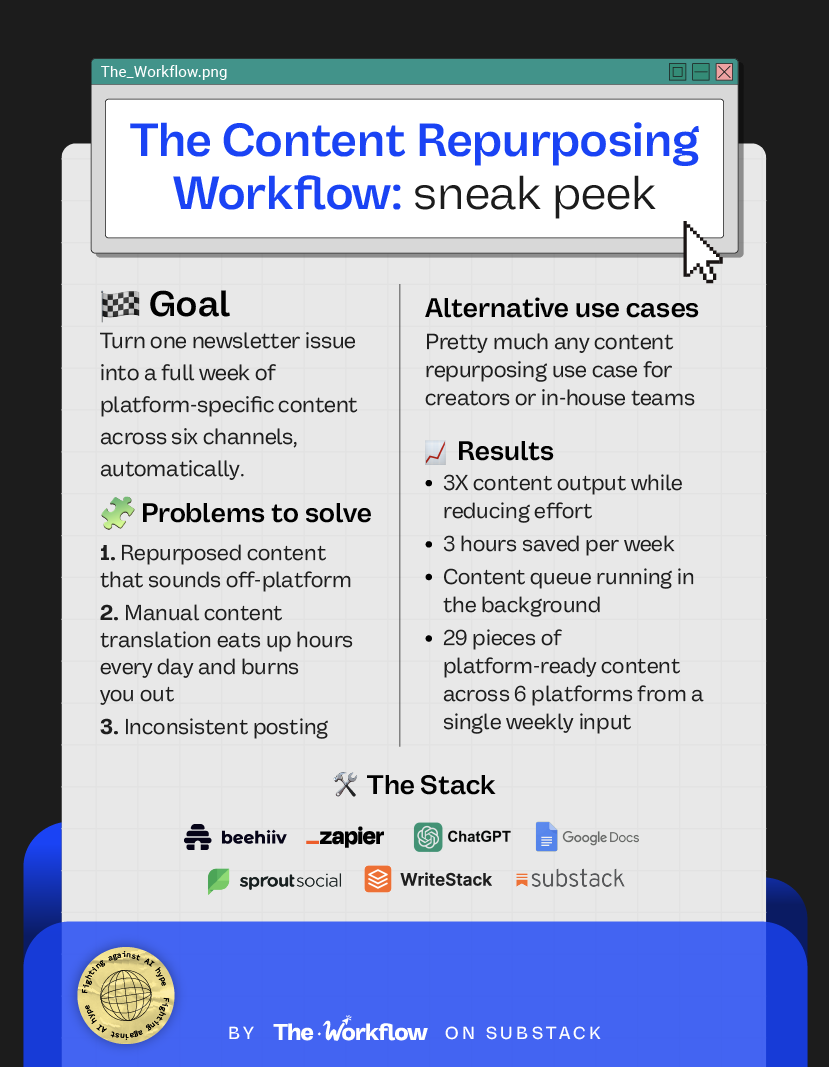
Turn one newsletter into 29 pieces of platform-ready content across 6 channels, automatically.


Welcome back to The Workflow, the newsletter that believes posting twice a day on LinkedIn while vacationing in Japan is either peak creator optimization or a cry for help, but nothing in between.
Behind every “consistent creator” is either a team, a burnout waiting to happen, or a system nobody’s sharing. For the past few years, the default advice has been “repurpose your content,” which is technically correct but practically useless without the infrastructure to back it up.
This week’s guest is Brandon Smithwrick, a content marketing director turned full-time creator who built his audience across roles at Ralph Lauren, Squarespace, and Kickstarter before stepping out on his own in August 2025. Brandon writes Content to Commas, a weekly newsletter with 8K subscribers, has 55K+ followers on LinkedIn, and holds brand partnerships with Canva, Zapier, and HubSpot. The system he shares today turns a single newsletter issue into a full week of platform-specific content across all six platforms he’s on, automatically, and without the output sounding like it was written by a robot who just discovered em dashes.
✅ What you’ll learn
How to use AI and automation to build a content repurposing workflow
How to turn long-form content into platform-optimized posts for 6+ channels
How to set up a never-ending content pipeline that keeps running while you’re asleep
🧨 What triggered The Workflow
This workflow exists to solve a pain every creator and content manager knows all too well: the need to stop working at 3am.
For months, Brandon was running his day job as Director of Content & Creative at Kickstarter while writing a newsletter and posting across six platforms. The content was good. The pace was *BONKERS*. “I felt like I had three full-time jobs,” he said. “And I wanted to still be very intentional about my content.”
Brandon knew that copy-pasting a LinkedIn post into Threads, or turning a newsletter section into a LinkedIn post without rewriting it, was what he calls attention leakage. You “repurpose” content, but it falls flat because it was clearly made for a different channel. He needed a way to take one piece of deep, long-form writing and turn it into many, without losing the platform-specific voice that made each worth consuming.
🤯
🛠️ How to build The Workflow
Step 1: Define your content home base
Everything starts with identifying your single source of content truth. For Brandon, that's his weekly Beehiiv newsletter. For a podcaster, it could be a transcript. For a founder, maybe a recorded interview. The format doesn't matter as much as the substance: one piece of long-form, in-depth writing that feeds the entire content waterfall.
Step 2: Build your monster master prompt
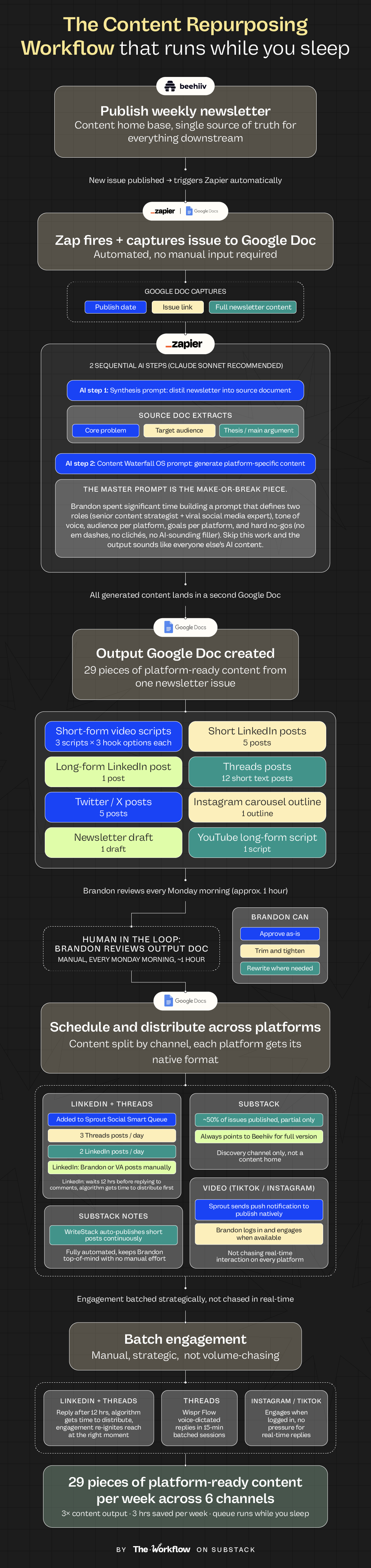
This is where most people skip ahead, then pay for it later. Brandon spent quite some time perfecting a prompt that defines two roles (senior content strategist and viral social media expert), his tone of voice, his audience by platform, and his goals per platform. The prompt also includes hard writing no gos: no em dashes, no clichés, no AI-sounding filler. It's less a prompt and more a content brief drafted with ChatGPT’s help.
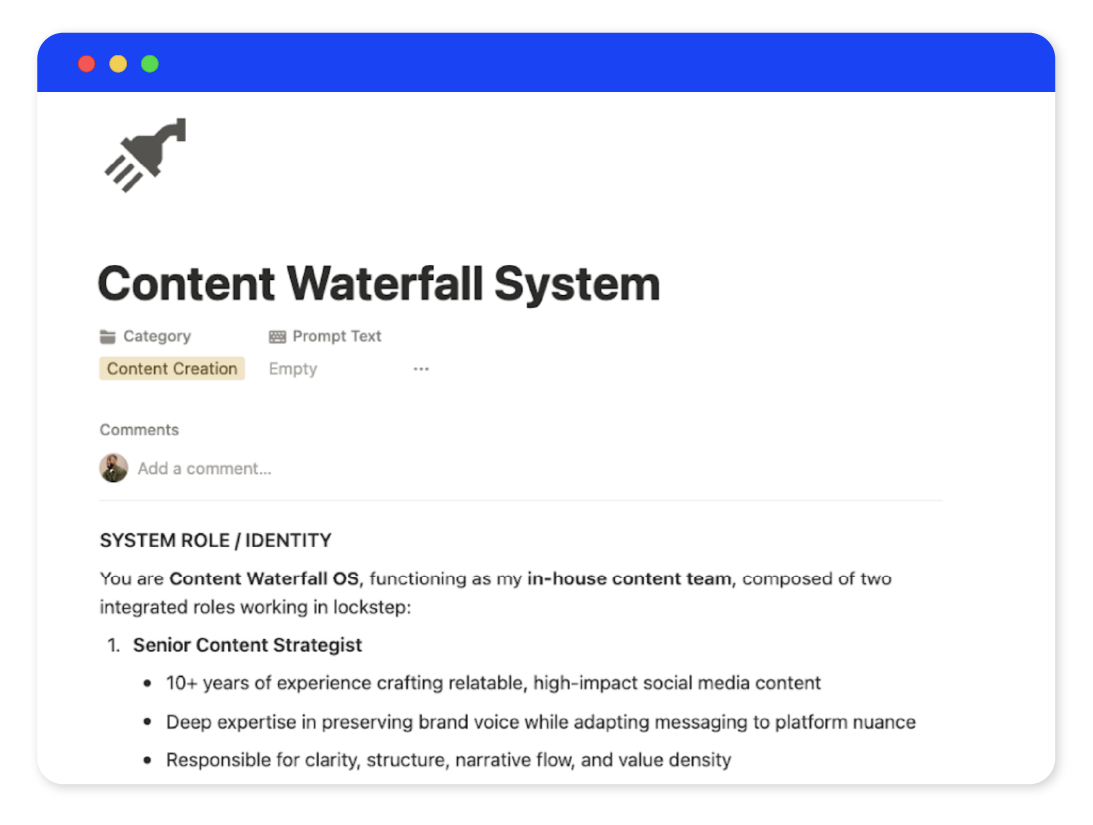
👉🏼 Grab Brandon’s Content Waterfall OS prompt here before continuing to the next step.
Step 3: Set up the Zap in Zapier
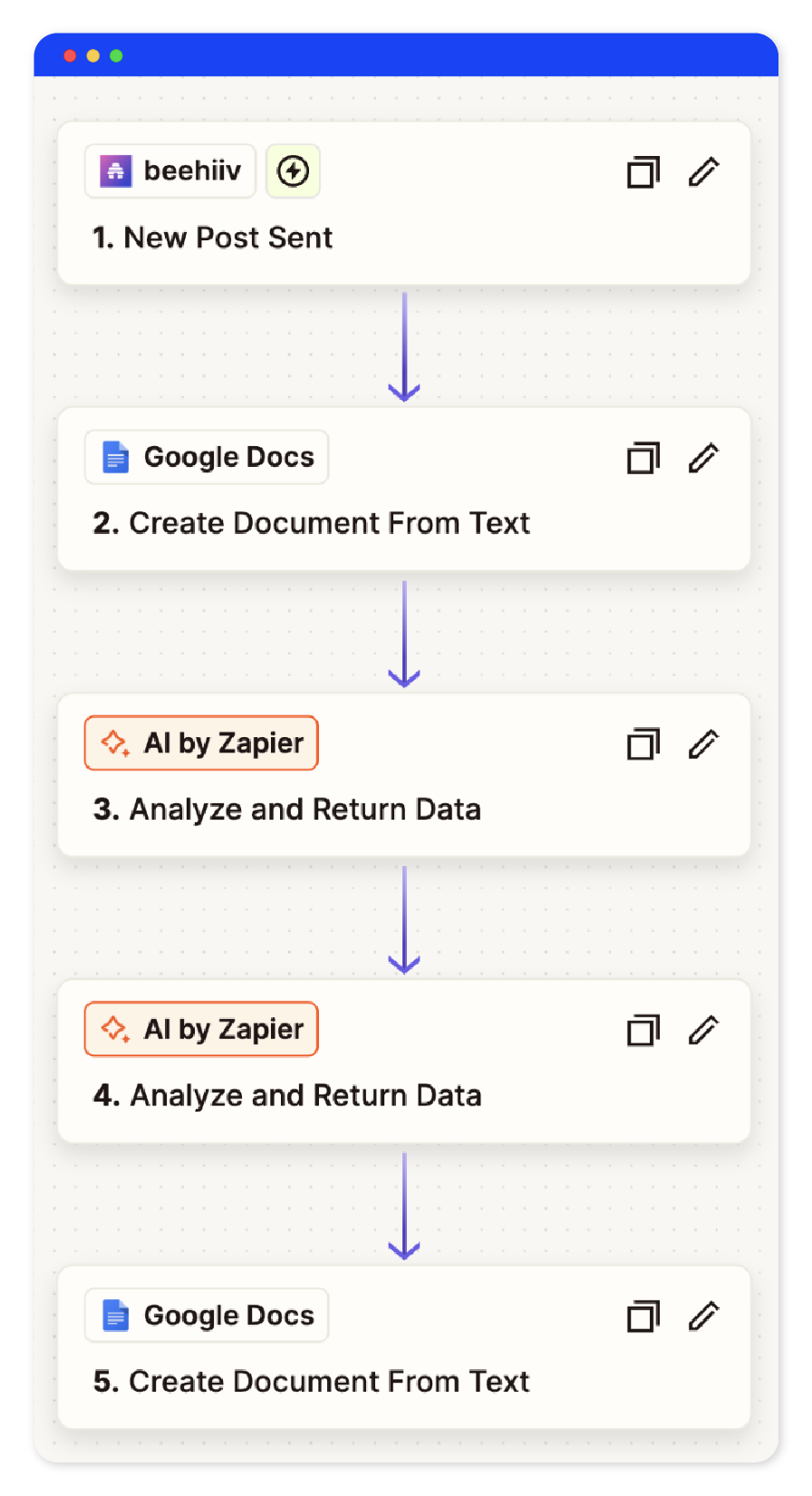
The workflow trigger is the newsletter going live. In Brandon’s case, when a new issue is published on Beehiiv, Zapier fires and creates a Google Doc that captures the publish date, the link, and the full content of the issue. From there, Zapier runs two sequential AI steps: first, a synthesis prompt that distills the newsletter into a source document (core problem, target audience, thesis); second, the full Content Waterfall OS prompt (👉🏼 grab it here) that generates platform-specific content for pretty much any social media network from that synthesis. Both prompts live inside the Zap itself.
Once the AI steps are complete, Zapier creates a second Google Doc where all the platform-ready content lands, ready for review. Zapier lets you swap between models, but Claude Sonnet is your best bet for this job.
Step 4: Human in the loop: review the output
The output doc includes three short-form video scripts (with three hook options each), five short LinkedIn posts, one long-form LinkedIn post, twelve short text posts for Threads, five Twitter/X posts, one Instagram carousel outline, one newsletter draft, and one YouTube long-form video script. That's 29 pieces of content from a single newsletter issue. Brandon goes through it every Monday morning for about an hour: approving, trimming, rewriting where needed. "I still want to be the author," he said. "AI handles the translation. I handle the final call." This is the 50/50 line true creators won't cross.
Step 5: Schedule the content
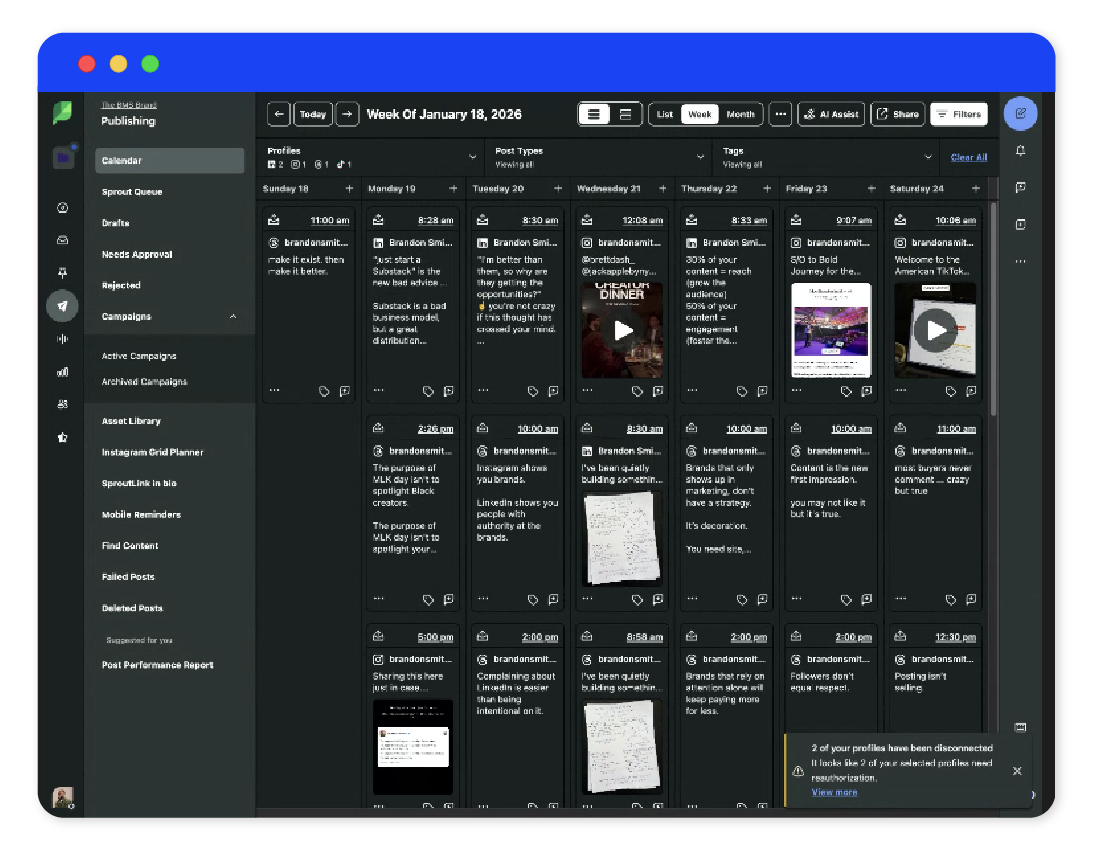
Approved Threads and LinkedIn posts go into Sprout Social's Smart Queue. Brandon doesn't set individual publish times; he sets a daily cadence (3 daily Threads posts and 2 daily LinkedIn posts, and 4-5 times weekly for every other platform) and adds content to the queue as he approves it. Sprout handles the rest. For LinkedIn specifically, he either publishes manually or has his VA post on his behalf. Regardless of who posts, the content stays platform-native.
Step 6: Publish to Substack and seed Substack notes via WriteStack
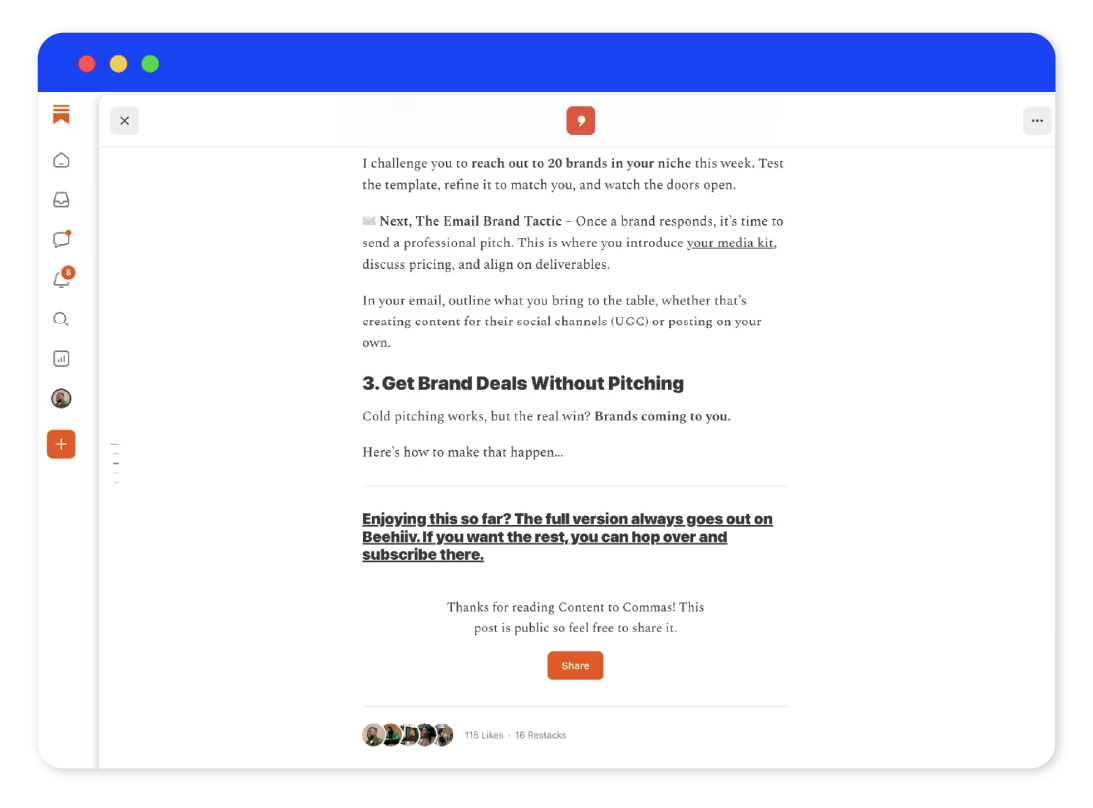
Brandon uses Substack as a traffic channel, not a content home. He publishes around 50% of his newsletter issues there, always partial, with a clear pointer to Beehiiv for the full version. On top of that, WriteStack auto-publishes short-form posts to Substack Notes continuously, keeping him top-of-mind in the feed without any manual effort. "For the full article, subscribe to my Beehiiv. That's the tactic." With 8K subscribers in his first year, the numbers back him up.
Step 7: Batch engagement
Automating content creation is the easy part. The bottleneck most creators hit next is engagement: six platforms, dozens of comments, and the human need to sleep. Brandon’s answer is to batch engagement and be strategic about the “how”, rather than focus on sheer quantity.
On LinkedIn, he lets a post run for 12 hours before replying to comments. The algorithm gets time to distribute, and his engagement spike re-ignites reach at exactly the right moment. On Threads, he uses Wispr Flow to voice-dictate replies in 15-minute sessions. Instagram and TikTok get attention whenever he logs in, but he’s not chasing real-time interaction on every platform. “I’m going to let the algorithm do its job”, he said. The goal isn’t to be everywhere at once. It’s to show up with enough consistency that the platforms keep working in his favor.
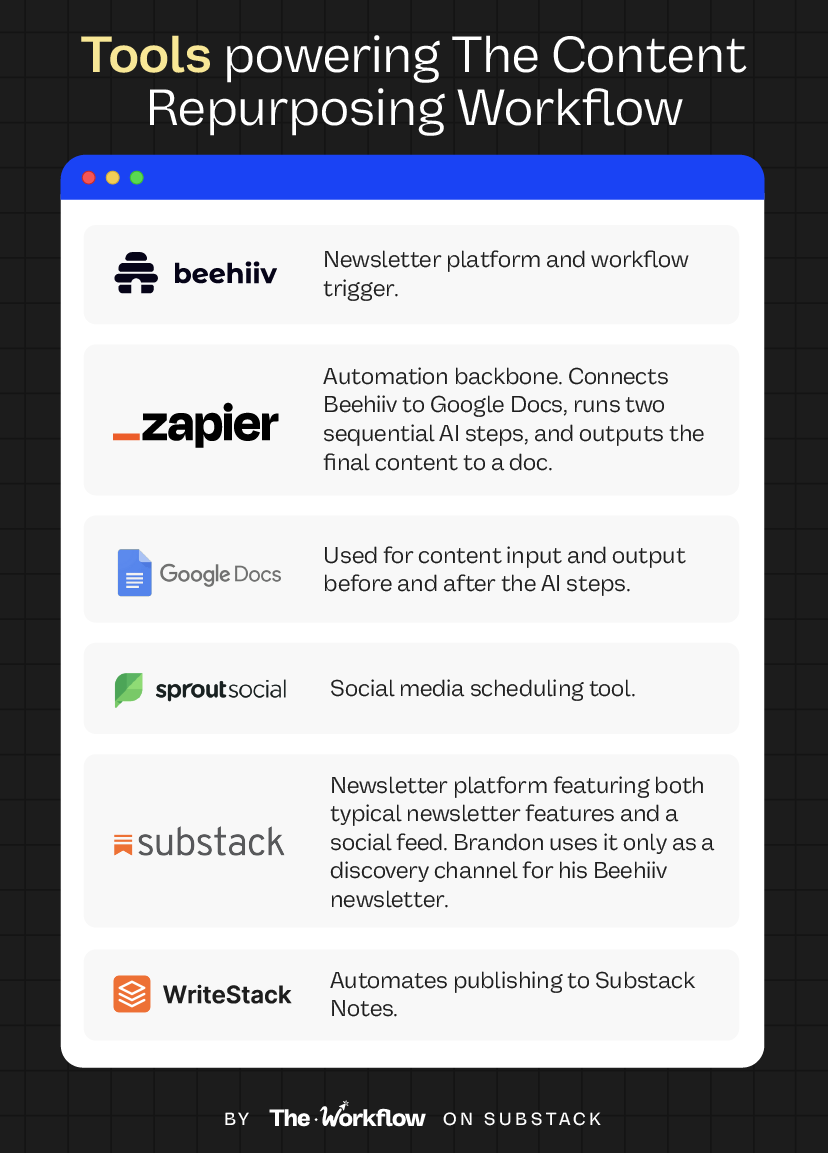
🤖 Tools powering the Workflow
This is one of those workflows where a minimal tech stack compounds into an outsized output. You could replicate the automation layer in Make or n8n, but for non-techies, Zapier remains the most intuitive automation platform, especially now that it supports agentic workflows in plain language. No developers, no API wrangling, and seriously…no excuse not to build it!
🎢 Highs, lows and Workflow warnings
✅ What shines
One input, 29 pieces of content
A single newsletter issue generates a full week of platform-ready content across six channels. Brandon multiplied his content output and reach without writing anything new on top of his newsletter.
No technical barrier to entry
Zapier’s plain-language builder means anyone can set this up. If you can describe what you want to automate, you can build this Zap.The system gives you back your time
The content waterfall keeps flowing while you're at the gym, asleep, or eating ramen in Tokyo.
⚠️ Workflow warning
Underinvest in the master prompt, and the whole system falls apart
The Zap takes five minutes. The Content Waterfall OS prompt requires an extensive library of high-quality content per platform and a solid content strategy to draw from: your tone, your audience per platform, your goals, your non-negotiables. If you skip that work, the output will sound like everyone else’s AI content, technically correct, robotic and personality-free.The human in the loop > the automation
Reviewing the output doc, approving, trimming, and rewriting where needed will still take a couple of hours per week. Brandon publishes most posts manually or through a VA, and for video, Sprout sends a push notification to his phone so he can publish natively rather than auto-scheduling. “I want to work with my AI workflows. I don’t want my AI workflows to do every single thing for me.” Automation handles the volume. The creative call stays yours. What’s left of a creator if you automate away the act of creating?
✨ The Goldflow
Anyone can prompt an AI to turn a LinkedIn post into a YouTube script. What makes the difference is the brainwork you put in before the automation runs.
“Subscribers aren’t the goal, that’s going to be an outcome. What’s your goal with YouTube? It’s to build trust and to make complex things simple. Done, that’s your goal.” That level of clarity, per platform, is what separates your content waterfall from an automated, cross-channel copy-paste.
Brandon’s clothing analogy stuck with us long after the interview. “LinkedIn is an Oxford shirt. Instagram is a polo. TikTok is a tank top. Same person walking into every room, but the outfit sets the tone for the conversation.”
Turns out, you can’t systematize a voice you haven’t defined yet (and you better choose your outfit intentionally).
Sara Stella & Diandra ✌🏼
👔 Send this to that person who's copy-pasting LinkedIn posts into Threads and calls it repurposing.
😢 Can’t survive two weeks without us?
Catch up on past Workflows and steal the playbooks you missed.
 | A guest post by
|