

The Claude Code Workflow that enforces your brand style guide
Turn your published articles into a living style guide and run eight parallel agents to enforce it at all times, automatically.


Welcome back to The Workflow, where we think AI hype is a new kind of yellow fever.
Unless you live under a rock, you must have seen the Claude Code posts. “Marketers who aren’t using this will be obsolete by Q3.” “I automated my whole life, and I’ve never felt more alive.” We figured we owed it to you to check what’s noise and what’s real.
So we called Tim Metz, Director of Marketing and Innovation at Animalz, one of the most respected B2B SaaS content marketing agencies in the space. Tim has a basic coding background and the specific kind of brain that, once it discovered Claude Code, immediately started automating everything in sight: content workflows, LinkedIn post generation, AEO audits, and yes, at some point, his own sleep tracking. The terminal is now his natural habitat.
His workflow for this issue fixes a problem every content team has and rarely admits to: your brand style guide exists in a Notion doc, gets mentioned during onboarding, and enforces absolutely nothing in practice.
Tim’s Claude Code workflow reads your published articles, extracts your actual editorial patterns, turns them into a working brand style guide, and then runs eight parallel agents to check any new article against it, line by line. He built the whole thing in about 20 to 30 minutes, which means by the time you finish this issue, you could have one running too.
✅ What you’ll learn
What Claude Code actually is and how it works
How to generate a brand style guide from your existing published content, without manual work
How to run eight parallel AI agents to copy-edit any article against your brand style guide
How to set up Claude Code even if the word “terminal” makes you cry
🧨 What triggered The Workflow
At Animalz, content goes through a meticulous editorial process: writer to editor to copy editor, with each step significantly impacting quality and stylistic nuance. For the agency’s own marketing, the same rules apply… in theory. Client work always takes front row, and Tim runs internal marketing largely solo, which means when a newsletter issue goes out on a Thursday and a blog post needs to be ready by “yesterday”, his editor is often staffed on external projects.
“Unfortunately, it’s happened that I published an article on the Animalz blog without spending enough time on the style editing review,” he told us. Anyone who has ever been a team of one knows exactly how that happens.
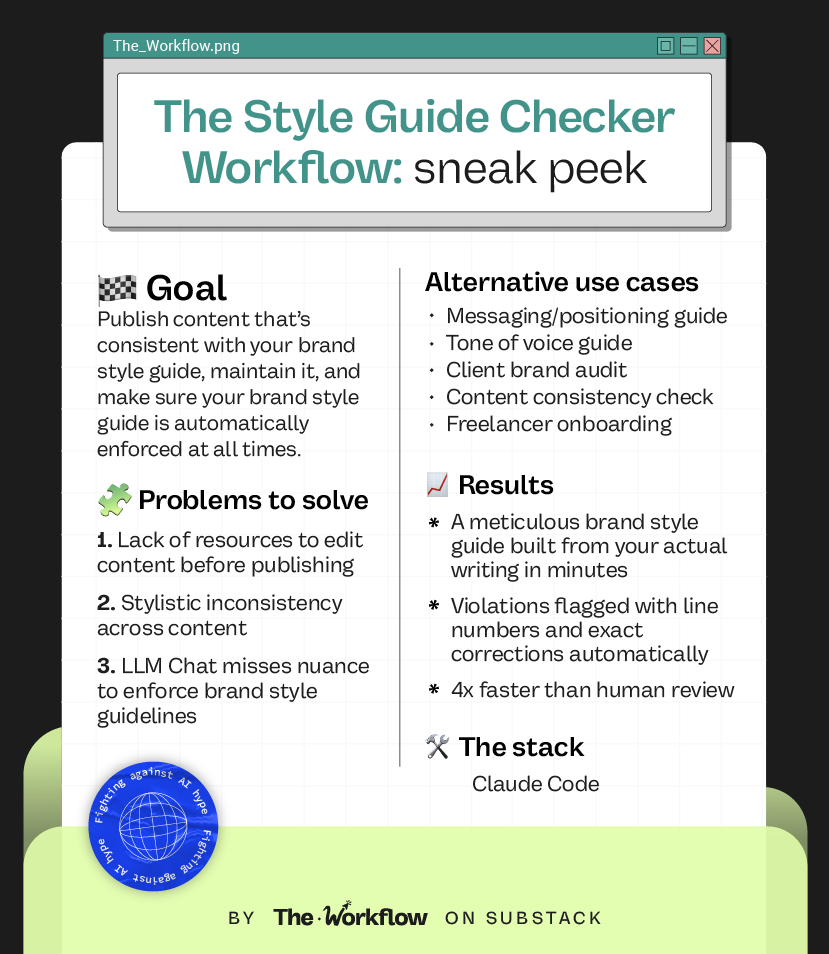
The second problem: because some articles skipped the process, the brand style guide had drifted. Certain rules were respected in some articles, but ignored in others. Nobody had a reliable picture of what the actual house style even was anymore. Brand style guide maintenance is the kind of task that always gets added to the list but never makes it to the top.
Tim had tried solving the problem with AI before. ChatGPT, earlier Claude models, various prompting approaches. They would catch some things and miss others. Inconsistently. Unpredictably. The problem was much bigger than the model: one context window, one pass, too much context and too many assets to hold at once.
Claude Code changed the constraint. And that changed the game for internal marketing at Animalz.
🛠️ How to build The Workflow
Before diving in: Claude Code runs in your computer’s terminal, which sounds more intimidating than it is. You don’t need to write code or trash your English literature degree. You can navigate it entirely in plain English, just as you’d use Claude, ChatGPT, or talk to us. The setup takes one command and about five minutes. If you want the full installation walkthrough, Tim wrote a no-code guide for content marketers on the Animalz blog.
You’ll need a paid Claude account (Pro or Max) to run Claude Code.
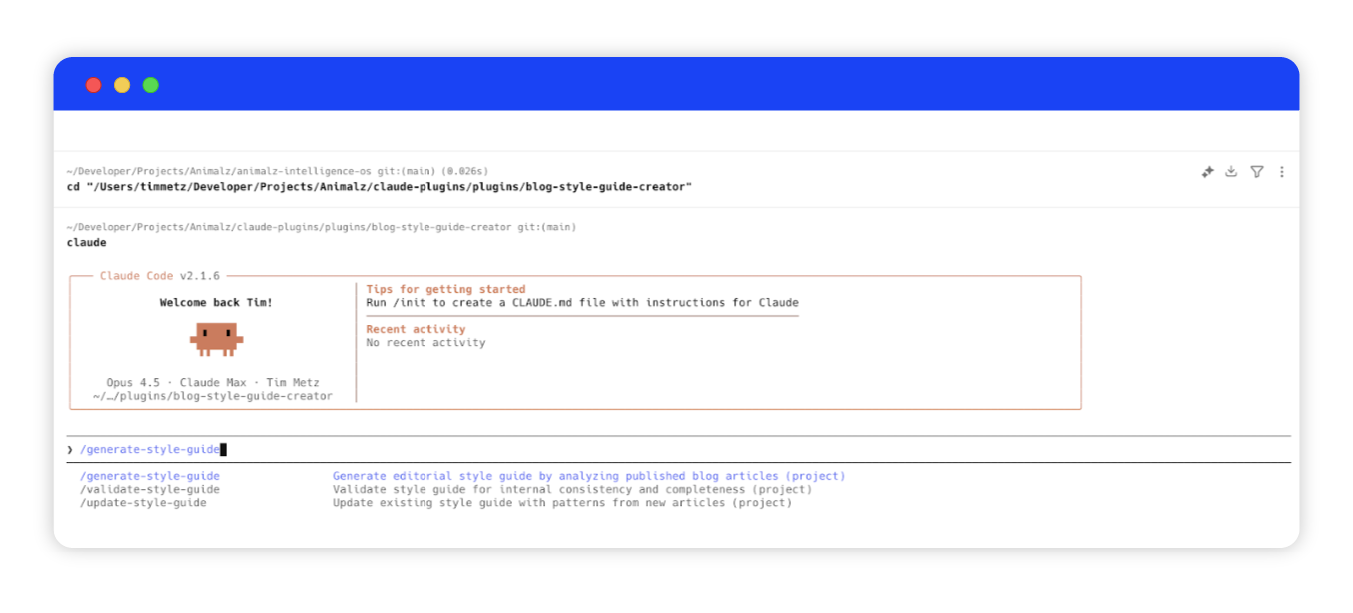
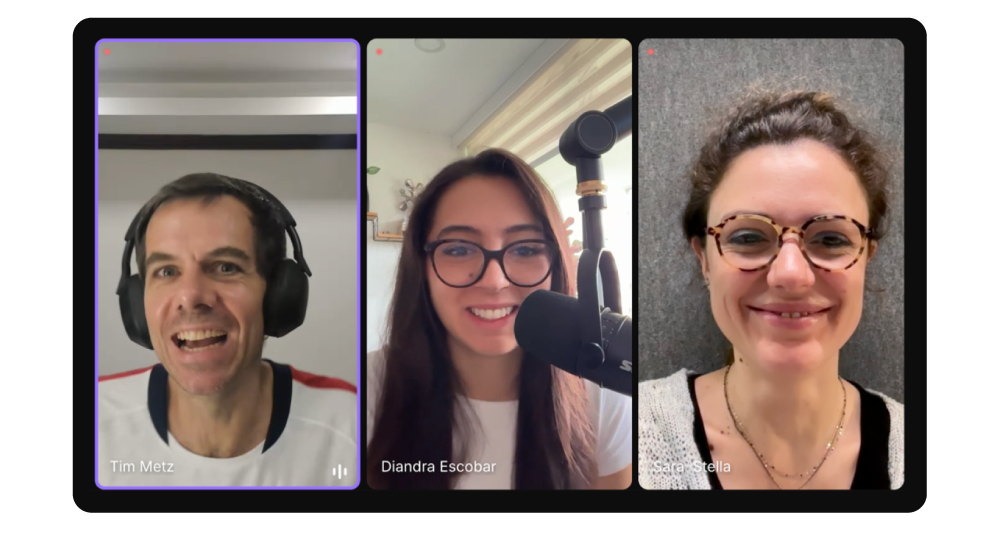
Step 1: Set up your project folder
Create a dedicated folder on your computer. This is where Claude Code will pull documents from and upload newly generated ones to. Call it something like blog-style-guide-creator so Claude Code immediately understands the context from the folder name alone. File naming and folder structure are not just organizational habits here: they’re part of how Claude Code understands what it’s working with. Make sure to be laser-sharp!
Inside this folder, you’ll need two types of files:
The command files tell Claude Code what to do when you run a slash command. There are two: one for
/generate-style-guideand one for/style-check.Each is a markdown file containing a detailed prompt that describes the full process Claude Code should follow. No need to write these from scratch.
The agent files are what make the style check work. There are eight of them (!!!), one per editorial dimension. Each defines the specific agent’s role, what it’s checking for, and how it should format its output. Claude Code reads these when it spins up the parallel agents we’ll see in Step 6.
⚠️ NOTE: No need to write any of these files from scratch. The templates in the zip are ready to use. Download, swap in your brand name, tweak for your own content, and run.
Once you’ve placed all the files in the folder, open your Finder, right-click the folder, and select “New Terminal at Folder.” Type claude and hit return. Claude Code will ask if you trust the files in this folder. Say yes, because you do. You’re in!
Step 2: Collect your source articles
Before you generate anything, Claude Code needs material to learn from. These are your published articles, the ones that already represent how you write at your best.
You have two options for providing them. Either drop local markdown or text files directly into the folder, or have a list of URLs ready to paste when Claude Code asks. If your blog has a sitemap (most do, usually at yoursite.com/sitemap.xml), you can point Claude Code there, and it will find the articles itself.
Tim recommends 10 to 15 articles for best results. Make sure to choose pieces that represent your typical writing, not your one-off content experiments. The brand style guide gets built from whatever you feed it, so a skewed sample will produce skewed rules.
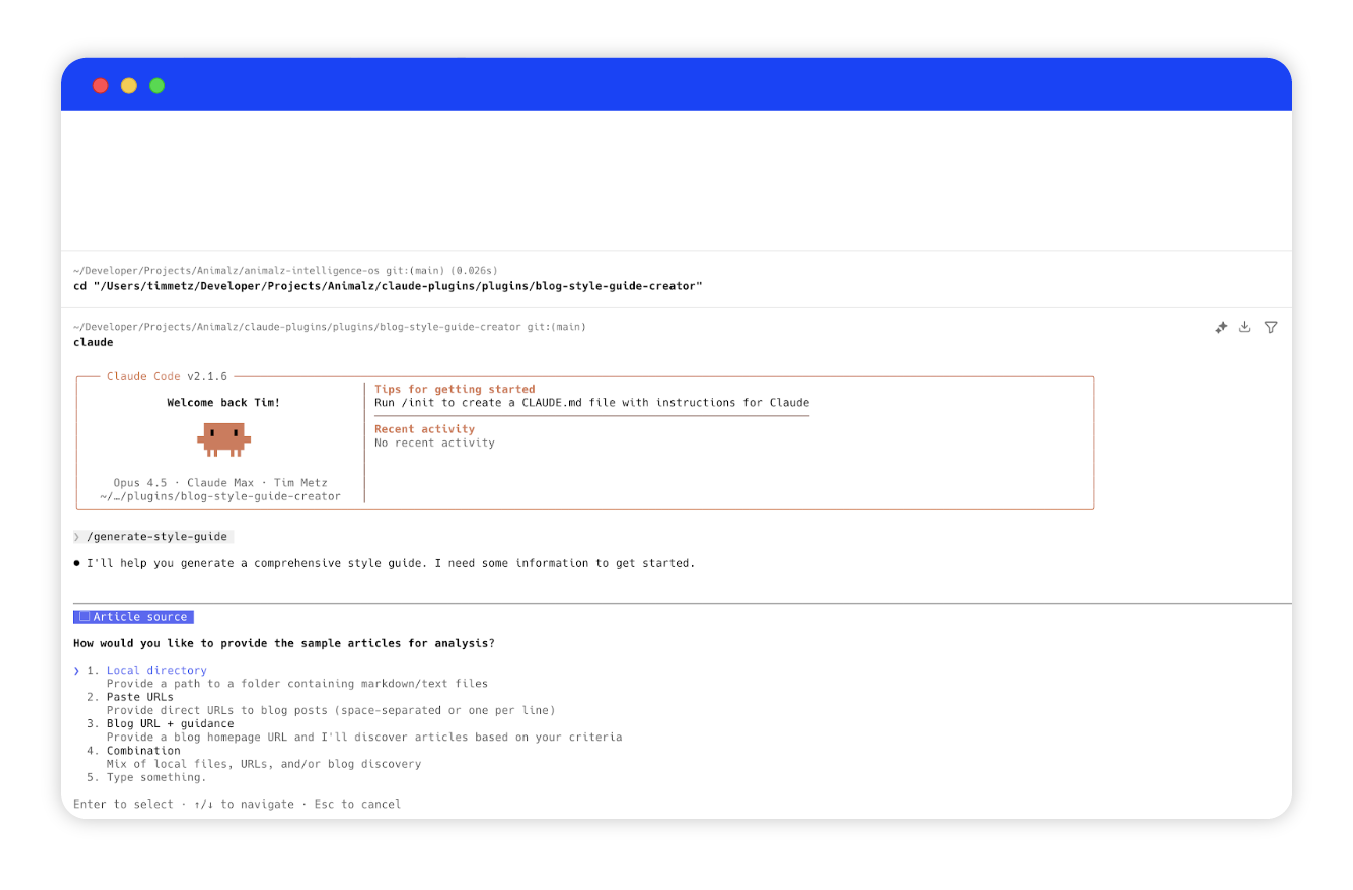
Step 3: Generate your brand style guide
Type /generate-style-guide [your brand name] and hit return. Claude Code will ask how you want to provide your source articles: a blog URL to scrape, specific URLs to paste, local files from your folder, or a mix. Pick whatever matches how you collected your articles in Step 2.
From here, Claude Code takes over. It fetches and stores the full text of each article locally and runs a brand style guide generator agent that analyzes patterns across eight editorial dimensions. This is the part that would take a human HOURS (and too much mental sanity) to do manually and still be full of errors.
The output is a markdown file saved inside your brands folder, with 50+ specific rules drawn directly from how you actually write. The whole process takes a few minutes.
👉🏻 See the example brand style guide we generated for The Workflow
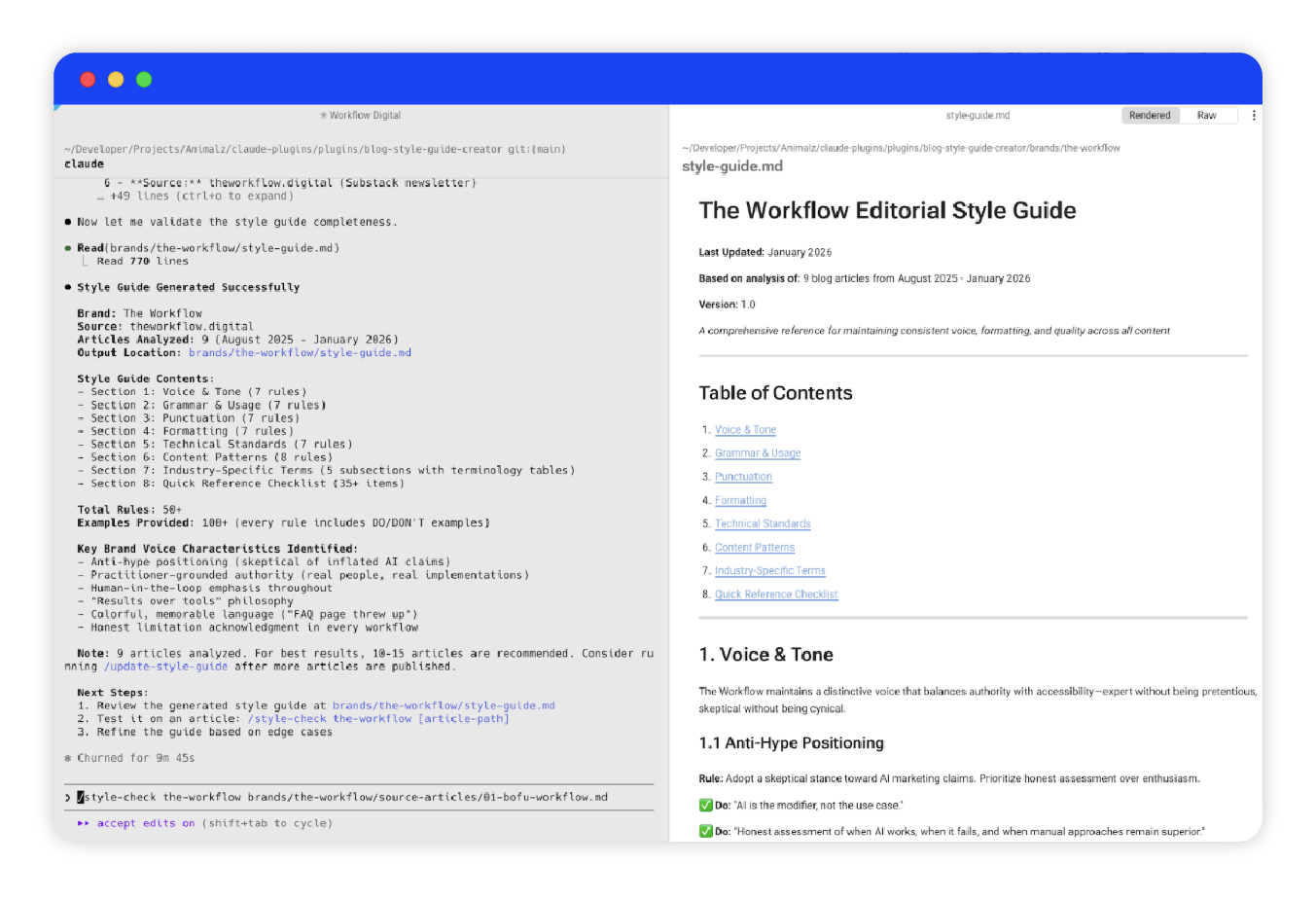
Step 4: Review the AI-generated brand style guide
Open the markdown file in your brands folder and read through it. Claude Code extracts patterns from your writing accurately most of the time, but it will occasionally give you false negatives or propose rules that don’t reflect your style. A brand style guide made of wrong rules enforces the wrong logic every time you run it, so catching errors here saves you from compounding them later. It’s AI, friend, not magic. ✨
Add missing rules, remove the ones that feel off, and make sure the language is yours. The guide is an easy-to-edit .md file.
Step 5: Run the brand style check on any article
Type /style-check [brand name] [article] and point it at a local file or URL. This is where the architecture does what a standard chat interface cannot.
Claude Code spins up eight parallel agents simultaneously (!!!), one for each section of the brand style guide. Each agent has a single focus and its own context window: one looks exclusively at voice and tone, one at grammar and usage, one at punctuation, and so on. Because they run in parallel rather than sequentially, the full check takes 5 to 10 minutes. A manual review covering the same eight dimensions would take 40 minutes or more.
The reason this catches what a single-prompt AI review misses is structural. One context window doing eight jobs at once will always deprioritize at least a few of them. Eight agents, each doing one focused job, do not.
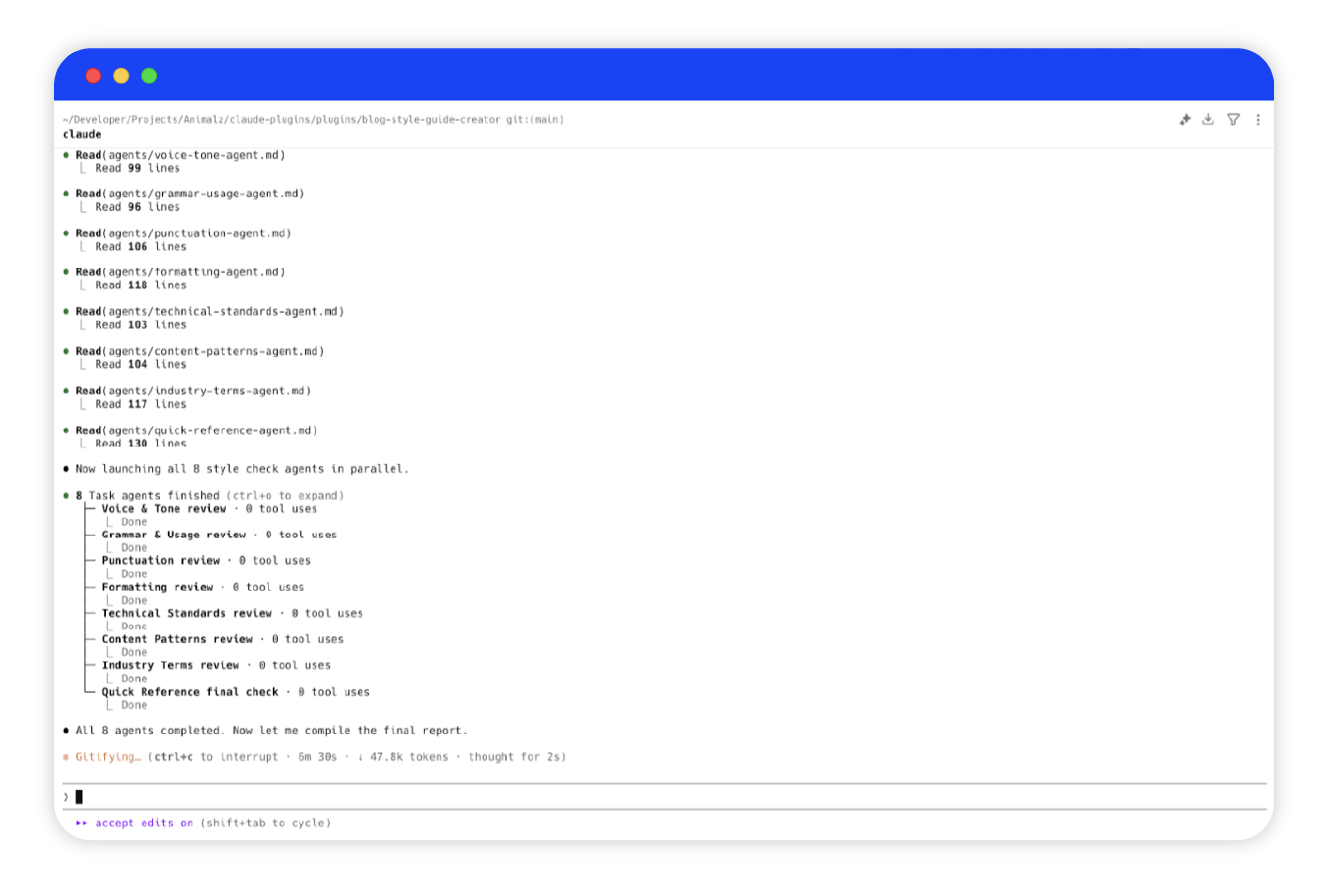
Step 6: Apply the corrections
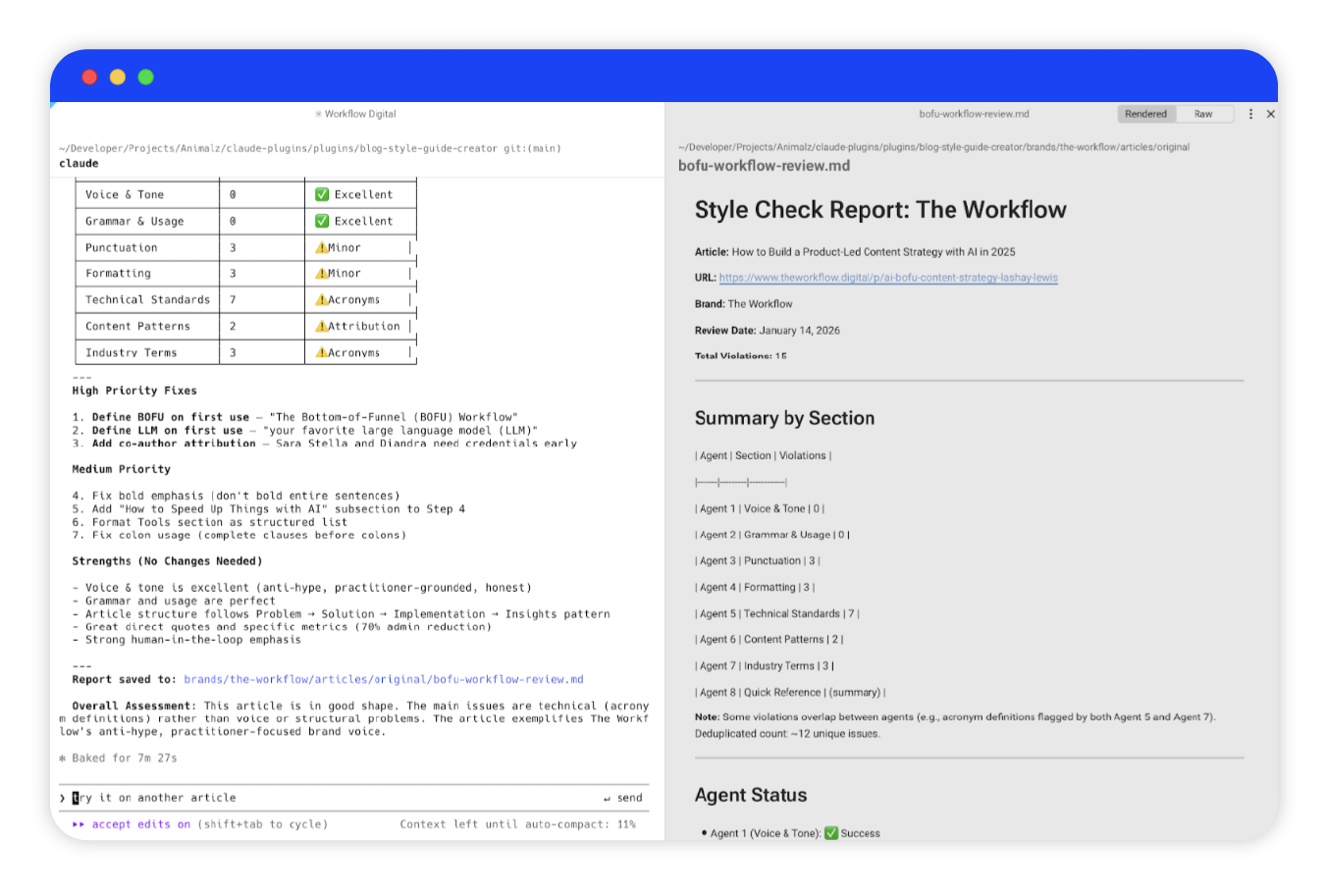
Claude Code outputs a detailed report flagging every violation it found, with the line number, the exact text, the rule it violates, and the suggested correction. Not “consider revising this section.” More like: line 47, passive voice, here’s the active version.
Tim ran it on a published Workflow article during our session, and it caught a metric claim without attribution, a poorly formatted structure, and a missing overview section in a piece that had already gone through editorial Sara’s review (Oooopsie).
Step 6: Update and finalize the article
We got three options for you. Fix issues manually by working through the report yourself, which gives you full control over every change. Run --auto-apply to let Claude Code make all corrections automatically and save a new version of the file. Or run --dry-run first to preview every change before committing.
For a first pass, --dry-run is worth it. --auto-apply on a piece you haven’t read carefully is where things get sloppy. The final, corrected article is saved as a new .md file in your folder, ready for publication.
🤖 Tools powering the Workflow
Kidding, there’s only ONE. Claude Code is all you need to run this entire workflow, which is either a relief or mildly suspicious, depending on how you feel about terminals.
If you want to go deeper on Claude Code beyond what this issue covers, here are two of the best no-hype guides we’ve come across (on top of Tim’s, of course!):
👉🏻 Claude Code for Everyone by Carl Vellotti
A free course taught entirely inside Claude Code itself. No videos, no docs, no coding experience required. You learn by doing real work inside the tool, guided by Claude at every step. The fastest way to go from zero to actually useful.
👉🏻 Claude Code for Everything by Hannah Stulberg
A five-part series that covers setup, core workflow, and a genuinely useful explainer on why AI gets worse the longer you talk to it, and how Claude Code fixes that. Written for non-technical people who want to use it for real work, not just coding.
🎢 Highs, lows and Workflow warnings
✅ What shines
It catches what everything else misses
The parallel agent architecture is not a gimmick. A single-prompt AI review runs one pass and hopes for the best. Eight focused agents running simultaneously, each with its own context window and a single editorial job, produce a qualitatively different result.
The style guide builds itself from your real writing
Most style guides get written once from scratch, live in Notion, and slowly become redundant. This one is extracted from how you actually write, which means it reflects your actual patterns rather than your intentions. That’s a HUGE difference.The setup cost is low relative to the ROI
Once the folder is set up and the style guide is generated, running a style check on any new article only takes a single command.
❌ What doesn’t shine
Token usage adds up fast
Eight parallel agents running simultaneously eat up significantly more tokens than a standard chat interaction. If you’re on a Pro plan and running this frequently, keep an eye on usage. You’ll Max it out fast (pun intended!).Watch your instructions
During our session, Tim caught the style guide generator using article summaries instead of full text. Not a hallucination: the prompt simply hadn’t specified full articles, so Claude Code defaulted to summaries. A small ambiguity in the instruction, a HUGE difference in the output.
⚠️ Workflow warning
The biggest risk here is behavioral. "It's so tempting to just hit next on what it proposes if it looks decent." Touché. A workflow that runs fast and spits out something that looks polished creates the perfect conditions for sloppy oversight. The style guide review in Step 4 and the violations report in Step 6 both require a human who is actually paying attention, not one who is relieved the hard part is over.
✨ The Goldflow
Tim literally built this workflow from a single voice memo. One recorded description of the problem, and Claude Code created 90% of the rest autonomously. 20 to 30 minutes, start to finish.
Tim’s also the first to flag what that speed costs you. “It’s surprisingly easy to go from being detail- and craft-oriented to lazy, letting AI take over and falling asleep at the wheel.” A workflow that builds itself in half an hour also lowers your standards in half an hour.
Tim is convinced AI will soon replicate anyone’s writing style perfectly. The models are almost there, and context windows are growing fast enough to hold the full spectrum of what makes your voice yours. But he doesn’t think that’s a reason to stop writing. “I haven’t found any alternative for working through your thoughts to clarify an idea that comes even close to the process of writing.”
So, friend, you can automate the style check. You can’t automate the thinking that makes the writing worth checking.
Sara Stella & Diandra ✌🏼
🤝 Forward this to someone if you’re dead tired of the Claude Code hype, but for whatever reason still love this article
🌯 It’s a major wrap
This was The Workflow, a bi-weekly newsletter by Sara Stella Lattanzio &Diandra Escobar, featuring one real workflow that moved the needle for someone even smarter than the system they built.
 | A guest post by
|